ALIGHT MOTION EXPORTS · LOWER-RIGHT MARK · 9:16
Alight Motion watermark remover that keeps your captions
Upload an Alight Motion export and this Alight Motion watermark remover rebuilds the corner under the logo while your captions and edits stay.
Files auto-delete after processing · Credits refunded if a job fails
Alight Motion watermark remover results on two edits
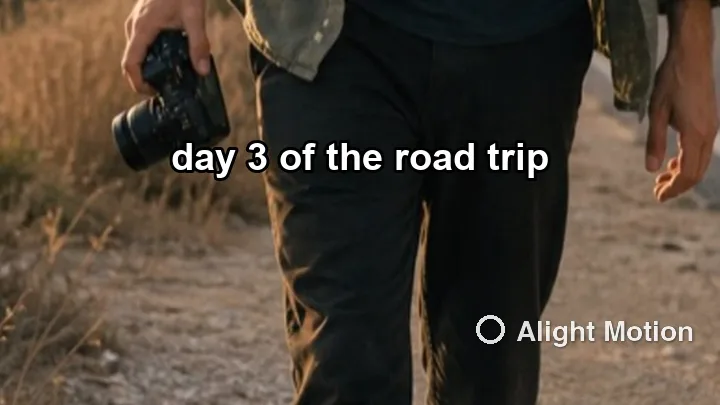
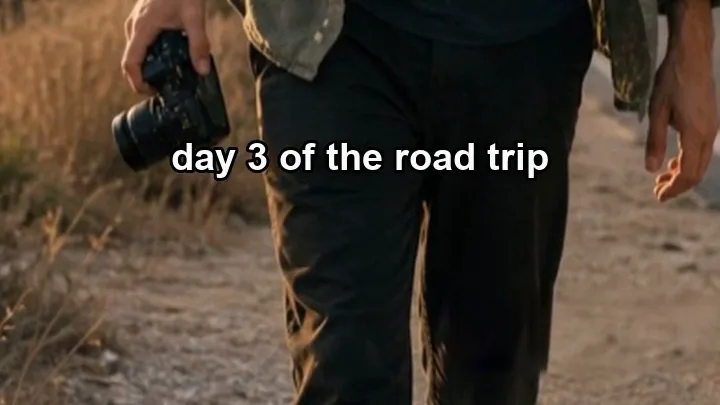
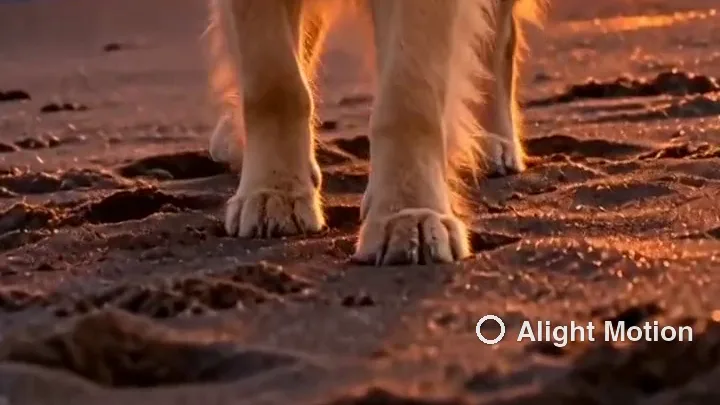
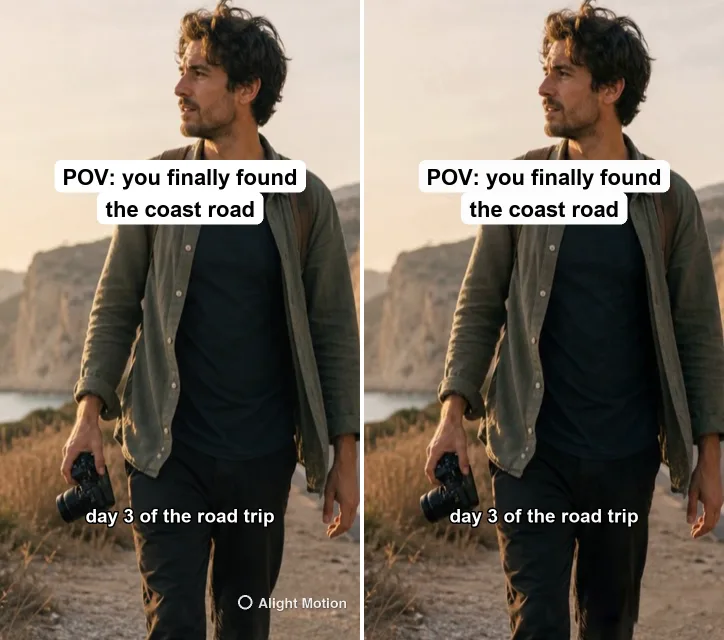
Lower corners of two 720×1280 clips, November 16, 2026. Left: upload. Right: what the Alight Motion watermark remover returned. The mark is our own recreation.
 before
 after
Travel edit with burned-in captions
A walking shot with two caption lines. The Alight Motion watermark remover cleared the logo and left the caption above it sharp in every frame we checked.
 before
 after
Beach clip, mark over wet sand
Footprints and glare on the sand behind the logo. The Alight Motion watermark remover filled the corner with sand that keeps moving with the shot.
Where the Alight Motion watermark sits
The free version of Alight Motion adds its logo and name to every video you export, in the lower right of a 9:16 frame. That corner is also where many edits put a caption, a sticker or the subject’s feet, so the Alight Motion watermark is hard to ignore.
Once exported, the mark is part of each frame. An Alight Motion watermark remover rebuilds that corner from the frames around it, like our remove watermark from video tool does for any overlay, and leaves the rest of your edit alone.
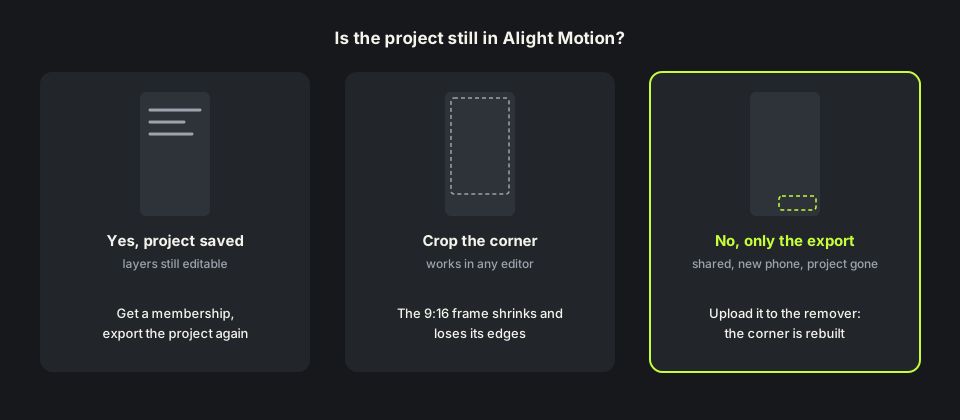
How to remove Alight Motion watermark before and after export
Before export the official route is simple: the App Store listing says paid memberships remove the watermark, so subscribe, open the project and export it again. Mod APKs that promise the same for free are unofficial builds; we would not install one on a phone you care about.
After export it is different. The project may be on an old phone, deleted, or a friend only sent you the MP4. That is when people search how to remove Alight Motion watermark from a finished video, and an Alight Motion watermark remover only needs that file.
Will the Alight Motion watermark remover keep my captions?
Yes, by default. Edits made in Alight Motion often carry burned-in text, so one test clip had two caption lines, one sitting just above the logo. The Alight Motion watermark remover cleared only the logo; both lines stayed sharp from the first frame to the last.
If you want the captions gone too, tick Also remove captions & on-screen text before you start. That run costs 2 credits per second instead of 1.
How we tested this Alight Motion watermark remover
We used two vertical clips we own and drew the mark ourselves: a small ring and the words Alight Motion in white at about 85% opacity, 26 pixels from the right and 60 from the bottom of a 720×1280 frame.
The travel clip was 8 seconds without sound, 8 credits. The beach clip was 5.2 seconds with sound, 6 credits. The Alight Motion watermark remover returned 720×1280 MP4s of the same length, and the beach clip kept its audio. Files went from 1.05 to 1.37 MB and 1.39 to 1.89 MB. Both jobs ran in one batch with two other clips and took about four minutes each.

Remove Alight Motion watermark free: credits and limits
Anyone can watch a free 480p preview of the first 10 seconds without signing up. New accounts get 10 free credits and one credit is one second of video, five minimum, so you can remove Alight Motion watermark free from a clip up to 10 seconds. Longer edits use one credit per second, and failed jobs are refunded. Packs are on the pricing page.
The Alight Motion watermark remover takes MP4, MOV or WebM up to 100MB and 10 minutes, in a phone browser too, so you can upload straight from the camera roll. The result is the same size as your export; it is not upscaled.
When an Alight Motion watermark remover struggles
A small corner logo is the easy case for an Alight Motion watermark remover. It gets harder when something you made sits on the mark: a sticker or your own logo in that corner may be read as a watermark and cleared with it. Move it in the project first if you can.
Use the Alight Motion watermark remover only on edits you made or have the rights to change. Editing in other phone apps too? The CapCut watermark guide, the InShot watermark remover and the KineMaster watermark remover cover their marks. Page updated November 16, 2026.
Alight Motion membership vs an Alight Motion watermark remover
Three ways to get a clean video, including an Alight Motion watermark remover.
| Membership, export again | Crop the corner | This Alight Motion watermark remover | |
|---|---|---|---|
| What you need | The project and a paid membership | Any editor | Only the exported video |
| Videos already exported | Export the project again | Yes | Yes, upload the file |
| Captions near the mark | Kept | Cut if they reach the corner | Kept, or removed if you tick the option |
| Picture | Full frame | Smaller frame or zoomed in | Corner rebuilt; 720×1280 kept |
| Cost | A membership subscription | Free | 1 credit per second; 10 free on sign-up |
HOW IT WORKS
Three steps. Under a minute.
Remove watermark from video in three moves — upload, let it auto-remove, then download the clean result.
- 01
Upload your clip
Drag in the video you own. MP4 or MOV.
- 02
Auto-detect & remove
The AI finds the mark and rebuilds the background — no manual masking.
- 03
Preview & download
Compare before/after, then export the clean version.
FAQ
Alight Motion watermark remover — FAQ
Is this Alight Motion watermark remover free?
New accounts get 10 free credits, enough for a 10-second edit, and anyone can preview the first 10 seconds. After that it is one credit per second.
Does a membership clean videos I already exported?
No. Export the project again after subscribing. If the project is gone, upload the video to the Alight Motion watermark remover.
Will the Alight Motion watermark remover remove my captions?
Not by default: in our test the logo went and the captions stayed. Tick the caption option if you want them removed too.
Can I use the Alight Motion watermark remover on my phone?
Yes. Upload from your camera roll in a phone browser; MP4, MOV or WebM up to 100MB.
Is a mod APK safer?
Mod APKs are unofficial builds of the app. We would not install one; a paid membership or a watermark remover avoids that risk.
Related tools
- Remove watermark from video
- InShot watermark remover
- KineMaster watermark remover
- Remove CapCut watermark
- Pricing
Remove Watermark from Video is not affiliated with, endorsed by, or sponsored by Alight Creative or Alight Motion. Alight Motion is a trademark of its owner. Our test clips used a recreated Alight Motion mark on footage we own.