FILMORA EXPORTS · CENTER MARK · 16:9
Filmora watermark remover for the center trial mark
Upload a Filmora export and this Filmora watermark remover rebuilds the middle of the frame where the free-plan mark sits, no re-edit needed.
Files auto-delete after processing · Credits refunded if a job fails
Filmora watermark remover results on two 16:9 clips
Center crops from two 8-second 1280×720 clips, November 16, 2026. Left: upload. Right: what the Filmora watermark remover returned. The mark is our own recreation.
 before
 after
Bright beach, mark over sea and sky
The two-line mark covered the horizon and a palm frond moving through it. The Filmora watermark remover took about two minutes; the mark was gone in every frame we checked.
 before
 after
Foggy night street at 2 seconds
Taillights and wet road behind the mark came back clean. The mark went in every frame, but the Filmora watermark remover got other things wrong; details below.
Why a Filmora watermark is harder than a corner logo
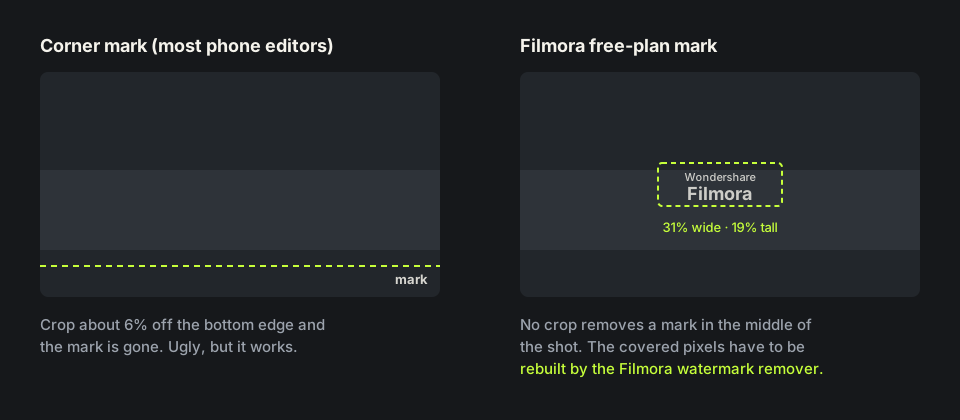
Phone editors tuck their mark into a corner, where a small crop hides it. The free plan of Wondershare Filmora prints its mark across the middle of the frame. In our recreation it covered 31% of the width and 19% of the height, right where your subject usually is.
Cropping cannot fix that, and a blur box leaves a smudge in the middle. A Filmora watermark remover has to rebuild the covered pixels from the frames around them, the same way our remove watermark from video tool handles any overlay.
How to remove Filmora watermark the official way
If you still have the project, the cleanest route is to buy a Filmora plan, sign in and export again. Wondershare support notes that videos already exported with the watermark cannot be cleaned by re-importing them, so a plan fixes the project, not the old file.
That is where people search how to remove Filmora watermark from a finished file: the project was on another computer, the trial ended, or a client only sent the MP4. A Filmora watermark remover only needs that exported file.
How we tested this Filmora watermark remover
For repeatable results we rebuilt the free-plan mark on two clips we generated and own: the words Wondershare and Filmora in white at about 60% opacity, centered, 398×136 pixels on a 1280×720 frame.
Both uploads were 7.9-second MP4s at 24 fps with AAC audio, 8 credits each. The Filmora watermark remover returned 1280×720 MP4s of the same length, audio intact. On the beach clip we checked frames at 1, 4 and 7 seconds and found no trace of the Filmora watermark; the file went from 8.5 to 7.3 MB.

Where the Filmora watermark remover failed in our test
The night clip shows the limit. The Filmora watermark remover cleared the mark from every frame, even when an oncoming car pointed its headlights straight through it, and the neon signs and lamp post next to the mark stayed as they were.
Behind the mark it got the motion wrong. The car that drives off into the fog stays close in the result instead of shrinking away, and a dark figure that was never in the clip walks through the headlight glare. If your Filmora export has strong backlight, glare or traffic moving behind the mark, check the whole result from the Filmora watermark remover before you post it.

Remove Filmora watermark free: credits and file limits
New accounts get 10 free credits and one credit covers one second, so you can remove Filmora watermark free from a clip up to 10 seconds long. Longer clips use one credit per second, five minimum, and failed jobs are refunded. For longer clips, Filmora watermark remover credit packs are on the pricing page.
The Filmora watermark remover takes MP4, MOV or WebM up to 100MB and 10 minutes. Desktop exports are often large: a 1080p file at about 10 Mbps reaches 100MB in roughly 80 seconds, so export shorter parts or a lower bitrate. The MP4 watermark remover page explains what comes back.
Before you upload a Filmora export
Upload the file Filmora exported, not a copy re-saved from a social app, because recompression gives the Filmora watermark remover less detail. If you want the cleanest edges, see remove watermarks without blur.
Use the Filmora watermark remover only on videos you made or have the rights to edit. Editing on your phone in KineMaster too? The KineMaster watermark remover covers its corner mark. For a Movavi trial export or a Bandicam recording, the Movavi watermark remover and the Bandicam watermark remover handle similar center marks. Page updated November 16, 2026.
Paying for Filmora vs a Filmora watermark remover
Three ways to remove Wondershare watermark marks.
| Buy Filmora, export again | Crop or blur box | This Filmora watermark remover | |
|---|---|---|---|
| What you need | The original project and a paid plan | Any editor | Only the exported video |
| Files already exported | Not cleaned; re-export the project | Yes | Yes, upload the file |
| Center mark | Never added | Crop cuts the subject; blur leaves a smudge | Rebuilt from nearby frames |
| Cost | A Filmora subscription or license | Free | 1 credit per second; 10 free on sign-up |
| Weak spot | Needs the project | Visible either way | Glare or headlights behind the mark |
HOW IT WORKS
Three steps. Under a minute.
Remove watermark from video in three moves — upload, let it auto-remove, then download the clean result.
- 01
Upload your clip
Drag in the video you own. MP4 or MOV.
- 02
Auto-detect & remove
The AI finds the mark and rebuilds the background — no manual masking.
- 03
Preview & download
Compare before/after, then export the clean version.
FAQ
Filmora watermark remover — FAQ
Is this Filmora watermark remover free?
New accounts get 10 free credits, enough for a 10-second clip. After that it is one credit per second of video.
Does buying Filmora remove the watermark from old exports?
No. Wondershare says exported files keep the mark. Buy a plan and export the project again, or upload the old file to the Filmora watermark remover.
Can I crop out the Filmora watermark?
Not cleanly. The free-plan mark sits in the middle of the frame, so any crop cuts into your shot. A Filmora watermark remover is the clean option.
Will the Filmora watermark remover change my resolution?
No. In our tests 1280×720 came back as 1280×720, same length, with audio.
When does it not work well?
Strong glare or traffic moving behind the mark. In our night test a car that drove away stayed in the picture, and a figure appeared in the headlight glare.
Related tools
- Remove watermark from video
- KineMaster watermark remover
- MP4 watermark remover
- Remove watermark without blur
- Pricing
Remove Watermark from Video is not affiliated with, endorsed by, or sponsored by Wondershare or Filmora. Filmora and Wondershare are trademarks of their owner. Our test clips used a recreated Filmora mark on footage we own.