BANDICAM RECORDINGS · TOP OR CENTER MARK · 16:9
Bandicam watermark remover for recordings you already saved
Upload a screen or game recording and this Bandicam watermark remover rebuilds the frame under the www.BANDICAM.com text, no new recording needed.
Files auto-delete after processing · Credits refunded if a job fails
Bandicam watermark remover results on two recordings
Crops from two 8-second 1280×720 screen recordings, November 16, 2026. Left: upload. Right: what the Bandicam watermark remover returned. Both marks are our own recreation.
 before
 after
Game recording, mark at the top
The old free-version text sat on a sky gradient. The Bandicam watermark remover cleared it in every frame we checked and the gradient runs straight through.
 before
 after
Web page recording, mark in the center
The big center mark is gone, but the FAQ words it covered were not rebuilt: two lines lost their ends. Text under the mark is the weak spot; details below.
Which Bandicam watermark is on your video?
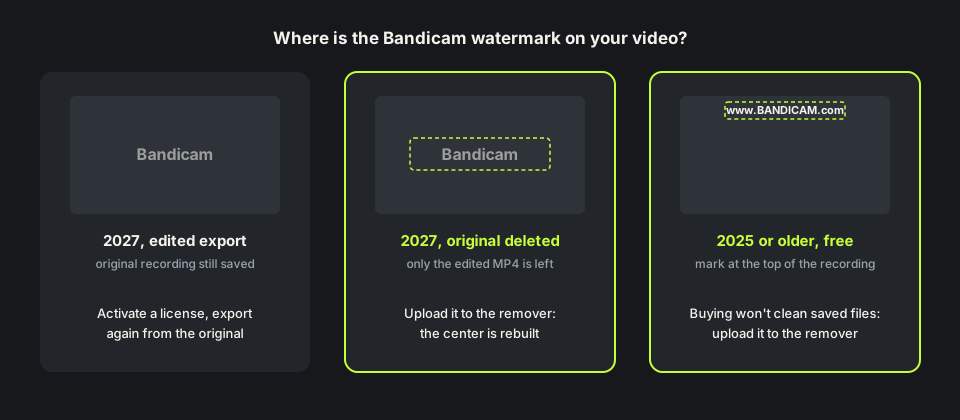
It depends on the version you recorded with. Free Bandicam 2025 and older put www.BANDICAM.com at the top of every recording and stopped at 10 minutes. Bandicam 2027 records without a mark but stamps one in the center of edited exports.
Either way the Bandicam watermark is now part of each frame. A Bandicam watermark remover rebuilds those pixels from the frames around them, the same way our remove watermark from video tool handles any overlay.
How to remove Bandicam watermark the official way
Bandicam is plain about it: buy a license, activate it under About, and new recordings and exports are clean. Its help page also says watermarks in previously saved videos do not disappear after purchase. With Bandicam 2027 you can export again from the original recording, because that file never had the mark.
Recordings from the older free version have nothing to export again from. That is why people still search how to remove Bandicam watermark from a finished file, and where a Bandicam watermark remover helps.
How we tested this Bandicam watermark remover
We made two screen recordings we own: a side-scrolling game demo with a score bar, and a scroll through our own pricing page. On the game we drew www.BANDICAM.com in white at the top, 30 pixels high. On the page we drew a large Bandicam mark at 55% opacity in the center.
Both uploads were 8-second 1280×720 MP4s at 24 fps, 8 credits each. The Bandicam watermark remover returned files of the same size and length, with the audio track intact. The game clip took about three and a half minutes, the page clip about six.

What the Bandicam watermark remover got wrong
Look at the bottom of the game frame above. The score and timer never move, so the Bandicam watermark remover read them as watermarks too and painted the ground over them. On the page recording the sticky menu bar at the top went the same way.
Words under the center mark were not rebuilt either. The AI can repaint a sky or a dark background, but it cannot read text the mark hid, so covered words come back blank or smudged. Recordings with a HUD, a taskbar or a lot of text near the mark are the weak spot for a Bandicam watermark remover. Watch the free preview before you spend credits.

Remove Bandicam watermark free: credits and file limits
Anyone can watch a free 480p preview of the first 10 seconds without signing up. New accounts get 10 free credits and one credit covers one second, five minimum, so you can remove Bandicam watermark free from a clip up to 10 seconds. Longer clips use one credit per second, and failed jobs are refunded. Packs are on the pricing page.
The Bandicam watermark remover takes MP4, MOV or WebM up to 100MB and 10 minutes, which covers a full 10-minute free recording only at a low bitrate. Long 1080p game captures are big, so trim to the part you need. The MP4 watermark remover page explains what comes back.
Before you upload a Bandicam recording
If the mark is a thin strip at the top and nothing important is there, cropping that strip is a fair free fix, no Bandicam watermark remover needed. Upload the file Bandicam saved, not a re-encoded copy, so the Bandicam watermark remover has the most detail to work with.
Use the Bandicam watermark remover only on recordings you made or have the rights to edit. Cutting the recording in a desktop editor afterwards? The Movavi watermark remover and the Filmora watermark remover cover their trial marks. Page updated November 16, 2026.
Buying Bandicam vs a Bandicam watermark remover
Three ways to deal with a saved Bandicam watermark, including a Bandicam watermark remover.
| Buy Bandicam, export again | Crop the mark out | This Bandicam watermark remover | |
|---|---|---|---|
| What you need | A license and the original 2027 recording | Any editor | Only the saved video |
| Older free recordings | Not cleaned; record again | Works for the top strip | Yes, upload the file |
| Center mark | Never added on new exports | Cuts into the picture | Rebuilt from nearby frames |
| Cost | A Bandicam license | Free | 1 credit per second; 10 free on sign-up |
| Weak spot | Needs the original file | Smaller frame | Text under the mark, fixed bars and HUDs |
HOW IT WORKS
Three steps. Under a minute.
Remove watermark from video in three moves — upload, let it auto-remove, then download the clean result.
- 01
Upload your clip
Drag in the video you own. MP4 or MOV.
- 02
Auto-detect & remove
The AI finds the mark and rebuilds the background — no manual masking.
- 03
Preview & download
Compare before/after, then export the clean version.
FAQ
Bandicam watermark remover — FAQ
Is this Bandicam watermark remover free?
New accounts get 10 free credits, enough for a 10-second clip, and anyone can preview the first 10 seconds. After that it is one credit per second.
Does buying Bandicam remove the watermark from old recordings?
No. Bandicam says marks on saved videos stay. With 2027 you can export again from the original; older free recordings need a crop or a Bandicam watermark remover.
Where is the Bandicam watermark?
At the top, reading www.BANDICAM.com, on free recordings from 2025 and older. In the center on edited exports from free Bandicam 2027. The Bandicam watermark remover handles both.
Will the Bandicam watermark remover keep my game HUD or toolbar?
Not always. In our test the score bar and a sticky menu bar were removed with the mark, because they never move.
Will the Bandicam watermark remover change my resolution?
No. In our tests 1280×720 came back as 1280×720, same length, with the audio track.
Related tools
- Remove watermark from video
- MP4 watermark remover
- Movavi watermark remover
- Filmora watermark remover
- Pricing
Remove Watermark from Video is not affiliated with, endorsed by, or sponsored by Bandicam Company. Bandicam is a trademark of its owner. Our test recordings used recreated Bandicam marks on screen captures we own.