INSHOT EXPORTS · 9:16 · NO RE-EDIT
InShot watermark remover for videos you already exported
Upload the video you exported; this InShot watermark remover rebuilds the corner behind the mark and returns an MP4 at the same size.
Files auto-delete after processing · Credits refunded if a job fails
InShot watermark remover results on two vertical exports
Corners of two 8-second 720×1280 test clips from November 16, 2026. Left is the upload, right is what the InShot watermark remover returned. We recreated the mark ourselves; see the test notes.
 before
 after
No Crop export with a blurred background
A landscape beach clip framed 9:16 over a blurred fill, the No Crop layout InShot is known for. The InShot watermark remover cleared it in about two minutes.
 before
 after
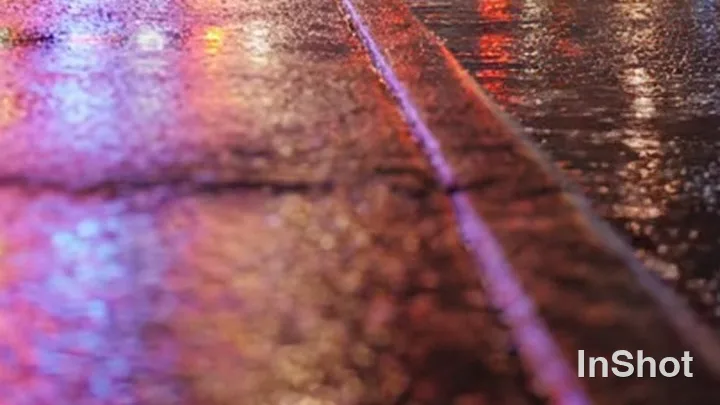
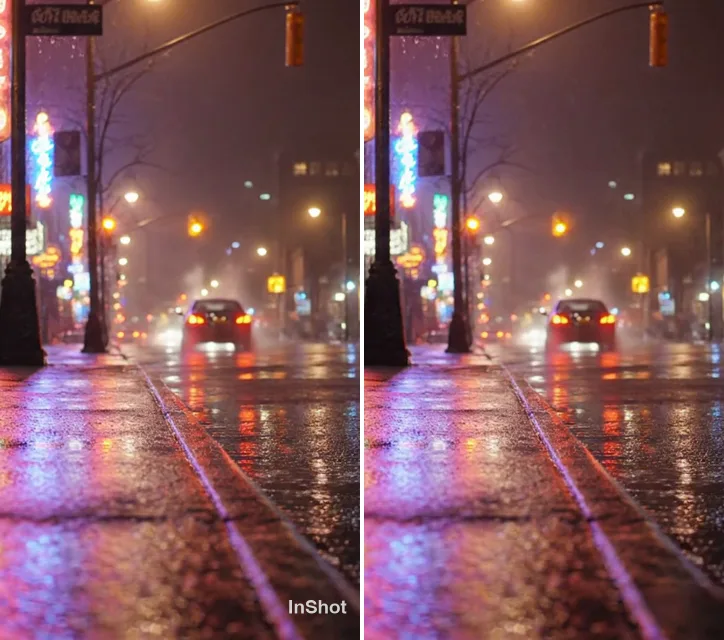
Full-screen 9:16 crop at night
The mark sat on wet pavement with moving neon reflections, a harder case. The job took about two minutes; the purple reflection now runs straight through the corner.
Where InShot puts its watermark, and why it stays
The free InShot app adds a small mark to every export, usually in the lower right. Inside the app it is still a layer you can clear. Once exported, the InShot watermark is part of every frame, so an editor can only crop it or cover it.
An InShot watermark remover works on the exported file. It finds the mark, follows it through the clip and rebuilds the pixels behind it, so you keep the full 9:16 frame. The InShot watermark remover uses the same engine as our remove watermark from video tool.
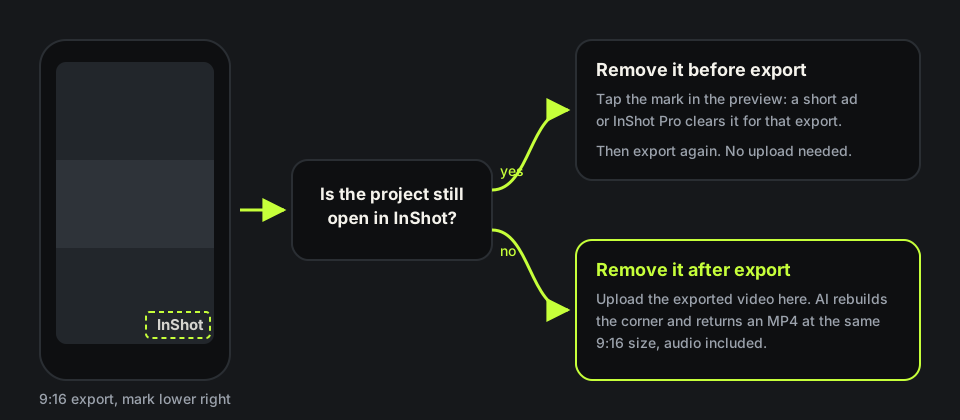
How to remove InShot watermark before you export
If the project is still in InShot, that is the quickest fix and you need no InShot watermark remover. In recent versions you tap the mark in the preview, and InShot drops it for that export after a short ad, or for good with InShot Pro. Options vary by version and region, so check your copy, then export again.
Use this InShot watermark remover when that route is closed: you deleted the draft, changed phones or only kept the export in your camera roll. You can also remove InShot watermark from video files exported months ago; the InShot watermark remover only needs the finished file.
How we tested this InShot watermark remover
InShot runs on phones and we wanted repeatable files, so we rebuilt its corner mark on two clips we generated and own: the word InShot in white, about 3% of the frame height, 22 pixels from the right edge and 48 from the bottom. One clip used the blurred No Crop layout, the other a full-screen crop.
Both uploads were 7.9-second 720×1280 MP4s at 24 fps with AAC audio, and each cost 8 credits. The InShot watermark remover returned 720×1280 MP4s of the same length, audio intact; size rose slightly after re-encoding, 3.5 to 3.6 MB and 3.2 to 3.3 MB. Frames at 1, 4 and 7 seconds showed no trace of the mark.

Does the InShot watermark remover touch anything else?
Only the area under the mark is rebuilt. In the night clip a lettered shop sign hangs at the top of the frame, and the InShot watermark remover left it exactly as it was, clearing only the corner overlay.
Colour, framing and length stay as exported. If you placed your own text or stickers near the corner in InShot, anything overlapping the mark may be rebuilt along with it.
InShot watermark remover free credits and limits
New accounts get 10 free credits, and one credit is one second of video, so an 8-second clip runs through the InShot watermark remover for free. Longer clips use one credit per second, five minimum, and failed jobs are refunded. Plans are on the pricing page.
Upload MP4, MOV or WebM up to 100MB and 10 minutes. InShot exports MP4, and the MP4 watermark remover page explains the file you get back. Nothing installs; the InShot watermark remover runs in the browser.
Where an InShot watermark remover struggles
Blur, sky, water and plain walls are easy. A mark on fine text, a face or a busy pattern can leave a faint trace, and a recompressed copy saved back from a social app gives the InShot watermark remover less detail. Upload the original export.
Use the InShot watermark remover only on videos you made or have the rights to edit. Editing in CapCut too? See remove CapCut watermark from video. Switched to KineMaster? Its top-corner text has a KineMaster watermark remover page, the badge on VEED exports has a VEED watermark remover, and Alight Motion edits have an Alight Motion watermark remover. Page updated November 16, 2026.
In-app removal vs an InShot watermark remover
Which route fits depends on whether you still have the project.
| In InShot, before export | This InShot watermark remover | |
|---|---|---|
| What you need | The project still open in the app | Only the exported video |
| Cost | A short ad, or InShot Pro | 1 credit per second; 10 free credits on sign-up |
| Clips you already posted | Not possible | Yes, upload the file |
| Picture | Clean export, nothing rebuilt | Corner rebuilt; the rest of the frame carried over |
| Where it runs | The InShot app | Any browser, phone or laptop |
| Size and audio | Your export settings | 720×1280 stayed 720×1280; audio kept |
HOW IT WORKS
Three steps. Under a minute.
Remove watermark from video in three moves — upload, let it auto-remove, then download the clean result.
- 01
Upload your clip
Drag in the video you own. MP4 or MOV.
- 02
Auto-detect & remove
The AI finds the mark and rebuilds the background — no manual masking.
- 03
Preview & download
Compare before/after, then export the clean version.
FAQ
InShot watermark remover — FAQ
Is this InShot watermark remover free?
New accounts get 10 free credits, enough for a 10-second InShot clip. Longer clips use one credit per second.
How do I remove InShot watermark without Pro?
Before export, tap the mark in InShot and watch the short ad. After export, upload the video to the InShot watermark remover and use your free credits.
Can I remove the InShot watermark from a video I already posted?
Yes, if you still have the file. Upload the original export, not a copy saved from a social app.
Will the InShot watermark remover change the 9:16 size?
No. In our tests 720×1280 came back as 720×1280, same length, with audio.
Does it work on InShot photos?
No. The InShot watermark remover handles video files only: MP4, MOV or WebM up to 100MB.
Related tools
- Remove watermark from video
- Remove CapCut watermark
- Remove TikTok watermark
- MP4 watermark remover
- Pricing
Remove Watermark from Video is not affiliated with, endorsed by, or sponsored by InShot or its developer. InShot is a trademark of its owner. Our test clips used a recreated InShot mark on footage we own.