MP4 · MOV · WEBM IN — CLEAN MP4 OUT
MP4 watermark remover upload an MP4, download a clean MP4
Upload the MP4 you exported; this MP4 watermark remover rebuilds the pixels behind the mark and returns an MP4 at the same size.
Files auto-delete after processing · Credits refunded if a job fails
What the MP4 watermark remover did to real clips
Frames from MP4 test clips we ran through this MP4 watermark remover in June 2026. Left is the uploaded MP4, right is the MP4 we downloaded.
 before
 after
Handle in the lower corner
A white @handle over rocks and grass in a 1280×720 MP4. The MP4 watermark remover tracked it through the clip and filled the grass behind the text.
 before
 after
Stamp across the middle
A see-through SAMPLE stamp and a play icon over a desk. Both went in one job; the keyboard and notebook lines under the word came back intact.
Why use an MP4 watermark remover instead of an editor?
MP4 is what phones, screen recorders, editing apps and AI video generators export. Once a watermark is exported into an MP4, it is part of every frame; an editor can only crop it out or cover it. An MP4 watermark remover works the other way: it rebuilds the area behind the mark and saves the clip as an MP4 again.
That is the difference between hiding a mark and removing it. If you want the general version of this tool, start on the remove watermark from video page; this page is about what happens to the file itself when you remove watermark from MP4 clips.
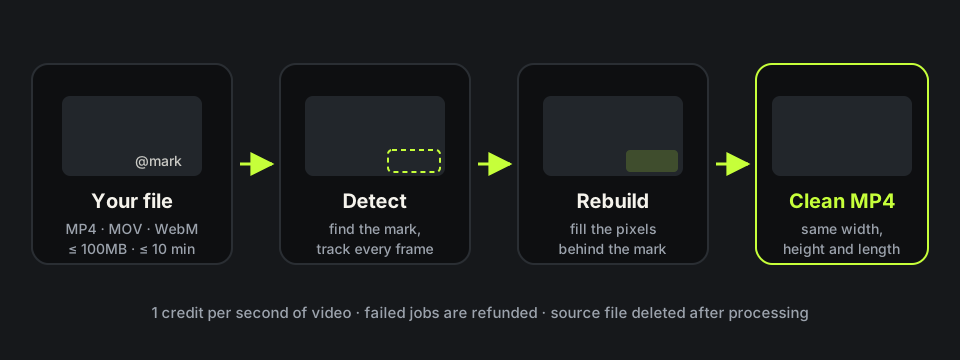
Will an MP4 watermark remover lower the quality?
Only the area under the mark is rebuilt. Every pixel outside it is carried over, and the clip is saved at the width, height and length you uploaded. In November 2026 we ran four 8-second 1280×720 MP4 clips through the MP4 watermark remover: each took 90 to 120 seconds, cost 8 credits, and came back as a 1280×720 MP4. On the two clips with sound, the audio track was still there.
Like any MP4 export, the MP4 watermark remover encodes the file again, so the byte size can change a little. You will not see a blur box, black bars or a zoomed crop. For a closer look at how the fill compares with blurring, see remove watermarks without blur.
How long an MP4 fits under the 100MB limit
The MP4 watermark remover takes files up to 100MB and 10 minutes. Size depends on bitrate, so a quick rule helps: megabytes ≈ bitrate in Mbps × seconds ÷ 8. A 720p export at about 5 Mbps fits roughly 160 seconds; a 1080p phone clip at about 16 Mbps fits about 50 seconds; a 4K clip at 45 Mbps reaches the limit in under 20 seconds.
If your MP4 is too big, trim it to the part with the watermark or export it again at 1080p before you upload. Avoid squeezing it with heavy compression: blocky artefacts around the mark make the fill harder, and the MP4 watermark remover works best on a clean export.
MP4 watermark remover free and online
New accounts get 10 free credits, and one credit is one second of video, so the MP4 watermark remover free tier covers a 10-second clip end to end. After that you pay per second, with a minimum of five credits per job, and a failed job is refunded. Plans and credit packs are on the pricing page.
It is an MP4 watermark remover online, so nothing installs on your phone or laptop. The source file is deleted shortly after processing, and the clean MP4 stays for a few days so you can download it.
Where an MP4 watermark remover struggles
Results are best on skies, walls, grass, water and soft-focus rooms. A mark over fine text or a crowd can leave a faint trace, and a mark covering a third of the frame is hard to rebuild; the Filmora watermark remover page shows one such center mark tested on two clips. On screen recordings, words under the mark may not come back; the Bandicam watermark remover page shows that case. Burned-in subtitles stay by default; tick Also remove captions & on-screen text if you want them gone too, at 2 credits per second.
Use it only on MP4 files you made or have the rights to edit. Removing another creator’s watermark or a stock library mark is against our terms. If the mark on your clip is a channel badge, the remove logo from video page shows logo results. For the Made with VEED badge on a downloaded export, see the VEED watermark remover. Page updated November 16, 2026.
MP4 in, MP4 out: what the MP4 watermark remover changes
What you hand the MP4 watermark remover and what you get back, based on the tool limits and our test clips.
| What you upload | What you download | |
|---|---|---|
| File type | MP4, MOV or WebM | MP4 |
| Size and length | Up to 100MB and 10 minutes | Same length as the upload |
| Resolution | As exported | Same width and height (1280×720 stayed 1280×720) |
| Audio | Original track | Kept on the clips we tested |
| Watermark area | Logo, handle or text stamp | Rebuilt from nearby frames, no blur box |
| Cost | 1 credit per second, 5 minimum | Failed jobs refunded |
HOW IT WORKS
Three steps. Under a minute.
Remove watermark from video in three moves — upload, let it auto-remove, then download the clean result.
- 01
Upload your clip
Drag in the video you own. MP4 or MOV.
- 02
Auto-detect & remove
The AI finds the mark and rebuilds the background — no manual masking.
- 03
Preview & download
Compare before/after, then export the clean version.
FAQ
MP4 watermark remover — FAQ
Is this MP4 watermark remover free?
New accounts get 10 free credits, enough for a 10-second MP4. Longer clips use one credit per second.
How do I remove watermark from MP4 online?
Upload the MP4 and watch a free preview, then sign in, confirm the cost and download the clean MP4 when it is ready. Nothing to install.
Will the MP4 lose resolution?
No. The MP4 watermark remover returns the width and height you uploaded; only the watermark area is rebuilt.
Can I upload MOV or WebM instead of MP4?
Yes. The MP4 watermark remover accepts MOV and WebM too, and the result you download is an MP4.
My MP4 is over 100MB. What can I do?
Trim it to the part with the watermark or export it again at 1080p, then run the smaller file through the MP4 watermark remover.
Does the MP4 watermark remover keep the audio?
Yes. On the clips we tested, the original audio came back in the MP4 we downloaded.