DAVINCI RESOLVE RENDERS · STUDIO MARK · 16:9 AND 9:16
DaVinci Resolve watermark remover for renders you already exported
Upload a render from free Resolve and this DaVinci Resolve watermark remover rebuilds the frame under the Studio mark.
Files auto-delete after processing · Credits refunded if a job fails
DaVinci Resolve watermark remover results on two renders
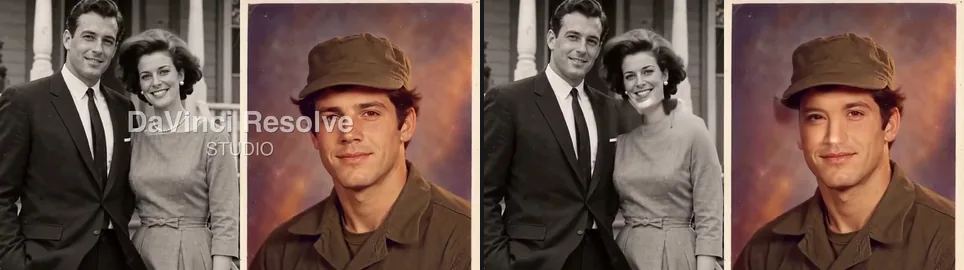
Crops from a 5-second 16:9 split screen and an 8-second 9:16 clip, November 20, 2026. Left: upload. Right: result. Both marks are our recreation.
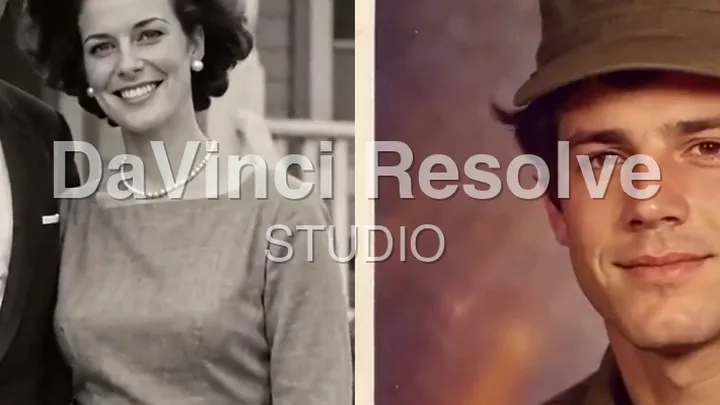 before
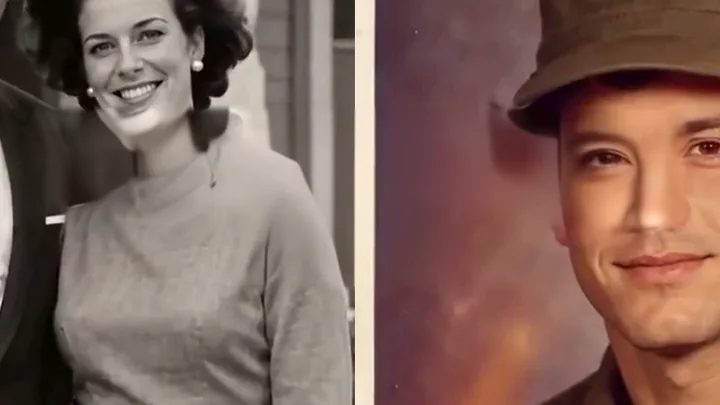 after
16:9 split screen, mark over two old photos
The whole DaVinci Resolve watermark is gone and the dividing line runs straight again. Look closer, though: the pearl necklace under the letters vanished and the soldier's eyes were redrawn.
 before
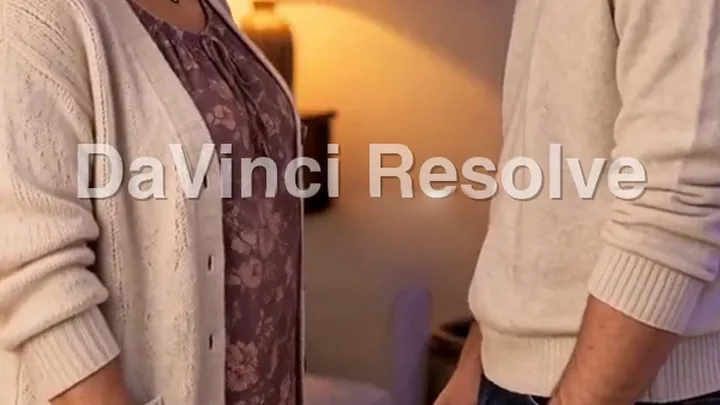 after
9:16 vertical timeline, mark over a living room
Here only STUDIO went. The DaVinci Resolve line spans two thirds of the frame, and the tool keeps text that wide as a likely title. More below.
Why is there a DaVinci Resolve watermark on my video?
The free DaVinci Resolve does not mark normal edits. The mark appears when a clip uses a tool only Studio includes, such as noise reduction or Magic Mask. The viewer then shows the DaVinci Resolve Studio watermark over that footage, and Blackmagic forum users report it in renders too.
Once rendered, the DaVinci Resolve watermark is part of each frame. A DaVinci Resolve watermark remover rebuilds those pixels from nearby frames, like our remove watermark from video tool does for any overlay.
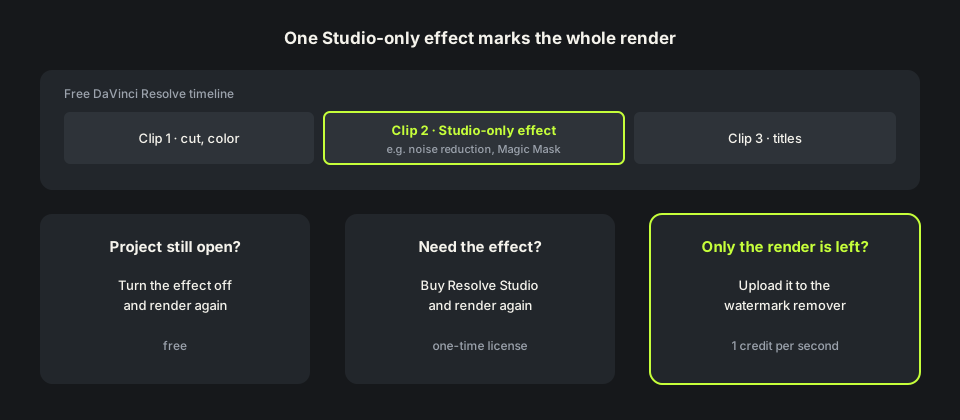
How to remove DaVinci Resolve watermark in Resolve
If you still have the project, the fix is free: find the clip with the Studio-only effect, turn it off or use a free tool instead, and render again. Or buy DaVinci Resolve Studio, a one-time license, and render with the effect on.
Neither helps when only the MP4 is left: the project was on another computer, a client sent the render, or the timeline is gone. That is when people search how to remove DaVinci Resolve watermark from the file itself.
How we tested this DaVinci Resolve watermark remover
We used two clips we own: a 5-second 1280×720 split screen of two restored photos and an 8-second 720×1280 living-room scene. On both we drew a Studio-style mark in the middle: grey DaVinci Resolve lettering with a white edge over STUDIO, about 610 pixels wide on 16:9 and 480 on 9:16.
We ran them through the same removal engine the site uses, on our own machine, so no credits were spent; at one credit a second they come to 5 and 8. To fit in memory, the split screen's big center area was processed at about a sixth of the site's pixels, so the site should be a bit sharper there. Both came back at the same size and length.
Where the DaVinci Resolve watermark remover fell short
A big DaVinci Resolve watermark over faces is the hard case. The tool cannot see under the letters, so it paints something likely: in the split screen the pearl necklace vanished, the neckline changed and the soldier's eyes came back different. Check faces closely in the free preview.
Vertical renders are the weak spot. On our 9:16 clip the DaVinci Resolve line stayed in every frame. Ticking Also remove captions & on-screen text, at reduced size, left broken white letters instead. If the line is still in the free preview, do not spend credits on that file.
Remove DaVinci Resolve watermark free: credits and file limits
Anyone can preview the first 10 seconds free at 480p, no sign-up. New accounts get 10 free credits at one credit a second, five minimum, so you can remove DaVinci Resolve watermark free from a clip up to 10 seconds. Failed jobs are refunded; packs are on the pricing page.
The DaVinci Resolve watermark remover takes MP4, MOV or WebM up to 100MB and 10 minutes. Resolve renders are often large: a 1080p H.264 file at about 10 Mbps reaches 100MB in roughly 80 seconds, so render only the marked part. The MP4 watermark remover page explains what comes back.
Before you upload a Resolve render
Check the project first. If it still opens, turning the Studio-only effect off and rendering again beats any DaVinci Resolve watermark remover. Upload the render itself, not a copy re-saved from YouTube.
Use the DaVinci Resolve watermark remover only on videos you made or have the rights to edit. Cut the same project in Filmora or a trial editor? The Filmora watermark remover covers its center mark. Started the edit in PowerDirector Essential? The PowerDirector watermark remover covers its mark. Grading 360 or action-camera footage that came out of the Insta360 app with its model name in the corner? The Insta360 watermark remover clears it. Page updated November 20, 2026.
Re-render, buy Studio, or use a DaVinci Resolve watermark remover
Three ways to deal with a DaVinci Resolve watermark.
| Turn the effect off, render again | Buy Resolve Studio | This DaVinci Resolve watermark remover | |
|---|---|---|---|
| What you need | The project | The project and a license | Only the rendered file |
| Keeps the Studio effect | No | Yes | Yes, it is already in the render |
| Project lost | Not possible | Not possible | Works, upload the file |
| Cost | Free | A one-time license | 1 credit per second; 10 free on sign-up |
| Weak spot | Lose the effect | Price | Faces under a big mark; 9:16 renders |
HOW IT WORKS
Three steps. Under a minute.
Remove watermark from video in three moves — upload, let it auto-remove, then download the clean result.
- 01
Upload your clip
Drag in the video you own. MP4 or MOV.
- 02
Auto-detect & remove
The AI finds the mark and rebuilds the background — no manual masking.
- 03
Preview & download
Compare before/after, then export the clean version.
FAQ
DaVinci Resolve watermark remover — FAQ
Is this DaVinci Resolve watermark remover free?
New accounts get 10 free credits, enough for a 10-second clip, and anyone can preview the first 10 seconds. After that it is one credit per second.
Why does free DaVinci Resolve add a watermark?
Only when a Studio-only tool such as noise reduction or Magic Mask is used. Normal edits render without a DaVinci Resolve watermark.
Does buying Resolve Studio clean a file I already rendered?
No. Render the project again in Studio, or upload the old file here.
Will the DaVinci Resolve watermark remover change my resolution?
No. Both test renders, 1280×720 and 720×1280, came back at the same size and length.
Does it work on vertical Resolve timelines?
Not well yet. On our 9:16 test only STUDIO was removed and the long DaVinci Resolve line stayed. Check the free preview before you spend credits.
Related tools
Remove Watermark from Video is not affiliated with, endorsed by, or sponsored by Blackmagic Design. DaVinci Resolve is a trademark of its owner. Our test renders used a recreated DaVinci Resolve Studio mark on footage we own.