FLIPACLIP MOVIES · 16:9 AND 9:16 · 12 FPS
FlipaClip watermark remover for animations you already saved
Upload the movie FlipaClip saved and the FlipaClip watermark is found and drawn out frame by frame, no Plus plan or new export needed.
Files auto-delete after processing · Credits refunded if a job fails
FlipaClip watermark removed from two animations
Crops from two 5-second animations we drew at 12 fps, 16:9 and 9:16, November 22, 2026. Left: upload. Right: result. The logo is our own recreated FlipaClip watermark.
 before
 after
16:9 stick figure, logo over grass
This logo is big enough that the default pass kept it as a title, so we ran the text option. The FlipaClip watermark and its black outline are gone on every frame we sampled. The grass tufts and two red flowers under the letters came back as plain green.
 before
 after
9:16 dancing character, logo over a flower bed
The FlipaClip watermark is gone on every frame we sampled and the character was not touched. Close up, the small flowers under the FlipaClip watermark came back as pink and yellow blobs on flat green; at phone size it reads as grass.
Why the FlipaClip watermark is on your movie
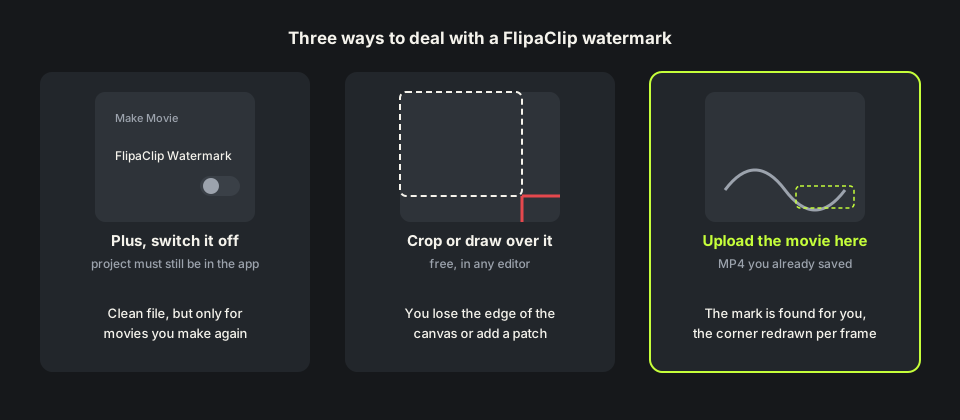
FlipaClip’s help center says it plainly: by default, FlipaClip movies have a watermarked logo, and removing it is a premium feature. With FlipaClip Plus you switch the FlipaClip Watermark toggle off in Make Movie before you save.
Once the movie is saved, the FlipaClip watermark is drawn into every frame of the MP4, like a line you inked. You can make the movie again with Plus, crop the canvas, or rebuild the pixels underneath, which is what our remove watermark from video tool does.
How to remove FlipaClip watermark in the app
With Plus active, open the project, tap Make Movie, turn off FlipaClip Watermark, and save again. The switch only affects the movie you are making now. Animations already in your camera roll or on TikTok keep the FlipaClip watermark.
That works while the project is still on your tablet. If you deleted it, switched phones, or only kept the MP4, there is nothing to make again, and how to remove FlipaClip watermark from the file is the real question.
How we tested the FlipaClip watermark remover
We drew two animations frame by frame at 12 fps, a common FlipaClip frame rate: a stick figure with a ball on a hill in 16:9 at 1280×720, and a purple character dancing over flowers in 9:16 at 720×1280. Each got a chunky white FlipaClip watermark with a black outline in the bottom right, about 360 pixels wide on 16:9 and 320 on 9:16.
Each movie is about 5 seconds: 5 credits for the 9:16 one, 11 for the 16:9 one, which needed the text option below. Both came back at the same canvas size, length and 12 fps, with the drawing outside the corner untouched.

When a big FlipaClip watermark is kept as a title
On the 16:9 movie the FlipaClip watermark is about 15% of the frame height and sits still on a plain canvas. Our detector reads large, still, opaque text like that as a title you wrote, so the default pass left it in place.
If that happens, tick Also remove captions & on-screen text and run it again. That pass removes all text it finds, costs 2 credits per second, and cleared the FlipaClip watermark in our test. Any title of your own will go too.

Remove FlipaClip watermark free: credits and file limits
Anyone can watch a free 480p preview of the first 10 seconds without signing up. New accounts get 10 free credits; one credit covers one second, five minimum. Failed jobs are refunded. Packs are on the pricing page.
Files can be MP4, MOV or WebM up to 100MB and 10 minutes. Most FlipaClip movies are far smaller, because flat drawings compress well. The MP4 watermark remover page shows how far 100MB goes.
Before you upload a FlipaClip movie
Upload the movie FlipaClip saved to your gallery, not a copy downloaded back from TikTok; each recompression smears thin lines. On your next movie, keep detailed drawing away from the bottom right corner.
Use this only on animations you drew or have the rights to edit. Finished the movie in another app? The Alight Motion watermark remover covers that mark too. Page updated November 22, 2026.
FlipaClip Plus vs removing the FlipaClip watermark
Three ways to deal with the logo.
| Plus, make the movie again | Crop or cover the corner | FlipaClip watermark remover | |
|---|---|---|---|
| What you need | A Plus subscription and the project | Any editor | Only the saved movie |
| Project deleted | Not possible | Works | Works, upload the MP4 |
| Canvas | Unchanged | Smaller or patched | Unchanged |
| Cost | A recurring subscription | Free | 1 credit per second; 10 free on sign-up |
| Weak spot | Old movies stay marked | Cuts your drawing | Fine lines right under the logo |
HOW IT WORKS
Three steps. Under a minute.
Remove watermark from video in three moves — upload, let it auto-remove, then download the clean result.
- 01
Upload your clip
Drag in the video you own. MP4 or MOV.
- 02
Auto-detect & remove
The AI finds the mark and rebuilds the background — no manual masking.
- 03
Preview & download
Compare before/after, then export the clean version.
FAQ
FlipaClip watermark — FAQ
Is this FlipaClip watermark remover free?
New accounts get 10 free credits, enough for a 10-second animation, and anyone can preview the first 10 seconds. After that it is one credit per second.
Does buying FlipaClip Plus remove the watermark from old movies?
No. Plus lets you switch the logo off for movies you make from now on. Movies you already saved keep the FlipaClip watermark until you make them again or upload them here.
Why did my FlipaClip watermark come back untouched?
A big logo on a plain canvas can look like a title to the detector. Tick Also remove captions & on-screen text and run it again; that pass costs 2 credits per second.
Will removing the FlipaClip watermark change my frame rate?
No. Our 12 fps tests came back at the same size, length and frame rate.
Related tools
- Remove watermark from video
- Alight Motion watermark remover
- InShot watermark remover
- MP4 watermark remover
- Pricing
Remove Watermark from Video is not affiliated with, endorsed by, or sponsored by Visual Blasters. FlipaClip is a trademark of its owner. Our test animations were drawn by us and carry a recreated FlipaClip-style logo.