POWERDIRECTOR ESSENTIAL · PHONE APP · 16:9 AND 9:16
PowerDirector watermark remover for videos you already produced
Upload the video PowerDirector produced and the PowerDirector watermark is cleared from the corner frame by frame, no reinstall or upgrade needed.
Files auto-delete after processing · Credits refunded if a job fails
PowerDirector watermark removed from two test videos
Crops from a 5-second 16:9 desktop video and a 5-second 9:16 phone video, November 21, 2026. Left: upload. Right: result. Both marks are our own recreation of a PowerDirector watermark.
 before
 after
Desktop 16:9, mark over a couple hugging
At 3.5 seconds the mark sat over his green shirt and dark jeans. The PowerDirector watermark is gone and the shirt hem runs on, though the jeans under the words came back a little darker. Frames right after a cut did worse; see below.
 before
 after
Phone 9:16, mark over a floral dress
A busy dark floral print is hard to rebuild. The PowerDirector watermark is gone on every frame we checked, and the flowers carry on through the corner, a touch softer than the rest of the dress.
Why the PowerDirector watermark is on your video
PowerDirector Essential is the free or trial build of the desktop editor. CyberLink says a video produced in Essential gets a PowerDirector image watermark, and that removing it means buying Ultra or Ultimate or subscribing to PowerDirector 365. The free phone app stamps its exports too.
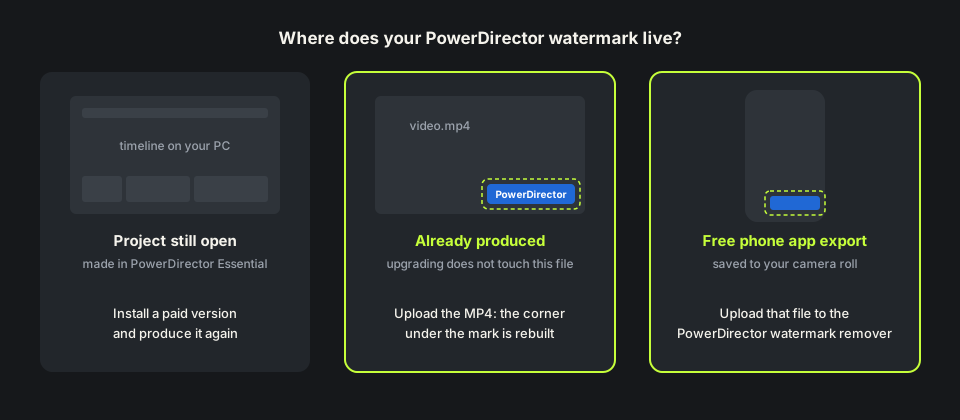
Once produced, the PowerDirector watermark is part of every frame of the MP4. You can produce the project again in a paid version, crop, or rebuild the pixels underneath, which is what our remove watermark from video tool does.
How to remove PowerDirector watermark after you upgrade
Upgrading only affects videos you produce afterwards. CyberLink forum users report that a trial video still showed the PowerDirector watermark after they bought Ultra; the advice there is to open the project in the paid version and produce it again.
That needs the project and every clip still on your computer. If you only kept the MP4 or exported from the phone app, there is nothing to produce again, so how to remove PowerDirector watermark from the file itself becomes the real question.
How we tested the PowerDirector watermark remover
On footage we own we drew a PowerDirector watermark in the bottom right corner: a blue play icon and the word PowerDirector in white, about 240 pixels wide on 1280×720 and 220 on 720×1280. The 16:9 video puts a beach clip beside a street clip with two hard cuts, like a produced timeline. The 9:16 video is one sunset portrait.
Each is about 5 seconds, so 5 credits. The PowerDirector watermark was found on every sampled frame, and both came back as MP4s of the same size and length with audio kept. The dog half was not touched.

Where the PowerDirector watermark remover can slip
Cuts are the weak spot. Our desktop video cuts at 2 and 4 seconds. For about half a second after the first cut, the corner held a pale block from the previous shot. After the second cut, a dark smear from the jeans stayed to the end. Before the first cut, a white sneaker under the PowerDirector watermark came out faded.
For a montage, upload each shot on its own, or check the frames after each cut in the free preview first. Long single shots gave the cleanest result.

Remove PowerDirector watermark free: credits and file limits
Anyone can watch a free 480p preview of the first 10 seconds without signing up. New accounts get 10 free credits; one credit covers one second, five minimum, so a clip up to 10 seconds is free. Failed jobs are refunded. Packs are on the pricing page.
Files can be MP4, MOV or WebM up to 100MB and 10 minutes. A long 1080p video may be bigger; trim the part with the PowerDirector watermark you need. The MP4 watermark remover page shows how far 100MB goes.
Before you upload a PowerDirector video
Upload the file PowerDirector produced, not a copy saved back from YouTube or a chat app; each recompression loses detail. If the PowerDirector watermark sits over background you do not need, a crop is a fair free fix.
Use this only on videos you made or have the rights to edit. Cut the same footage in another trial editor? The Filmora watermark remover and the DaVinci Resolve watermark remover cover their marks. Page updated November 21, 2026.
Buy PowerDirector vs remove the PowerDirector watermark
Three ways to deal with the mark.
| Paid version, produce again | Crop the corner | PowerDirector watermark remover | |
|---|---|---|---|
| What you need | Ultra, Ultimate or 365, plus the project | Any editor | Only the produced video |
| Project or clips gone | Not possible | Works | Works, upload the file |
| Frame size | Unchanged | Smaller or reframed | Unchanged |
| Cost | A CyberLink licence or subscription | Free | 1 credit per second; 10 free on sign-up |
| Weak spot | Needs the original project | Cuts the picture | Fine detail right under the mark |
HOW IT WORKS
Three steps. Under a minute.
Remove watermark from video in three moves — upload, let it auto-remove, then download the clean result.
- 01
Upload your clip
Drag in the video you own. MP4 or MOV.
- 02
Auto-detect & remove
The AI finds the mark and rebuilds the background — no manual masking.
- 03
Preview & download
Compare before/after, then export the clean version.
FAQ
PowerDirector watermark — FAQ
Is this PowerDirector watermark remover free?
New accounts get 10 free credits, enough for a 10-second clip, and anyone can preview the first 10 seconds. After that it is one credit per second.
Does buying PowerDirector remove the watermark from old videos?
No. Videos you already produced keep the PowerDirector watermark. Produce the project again in the paid version, or upload the old file here.
Does it work on videos from the PowerDirector phone app?
Yes. Upload the exported video from your camera roll. Our 9:16 test used a mark in the bottom-right corner, where phone app marks usually sit.
Will removing the PowerDirector watermark change my video size?
No. In our tests 1280×720 and 720×1280 came back at the same size and length, with the audio track.
Related tools
- Remove watermark from video
- Filmora watermark remover
- DaVinci Resolve watermark remover
- MP4 watermark remover
- Pricing
Remove Watermark from Video is not affiliated with, endorsed by, or sponsored by CyberLink. PowerDirector is a trademark of its owner. Our test clips used a recreated PowerDirector-style mark on footage we own.