VIDEOLEAP EXPORTS · CORNER MARK · 9:16 AND 4:5
Videoleap watermark remover for edits you already exported
Upload the video you exported from Videoleap and the Videoleap watermark is found and cleared frame by frame, no Pro plan or brushing needed.
Files auto-delete after processing · Credits refunded if a job fails
Videoleap watermark removed from two exports
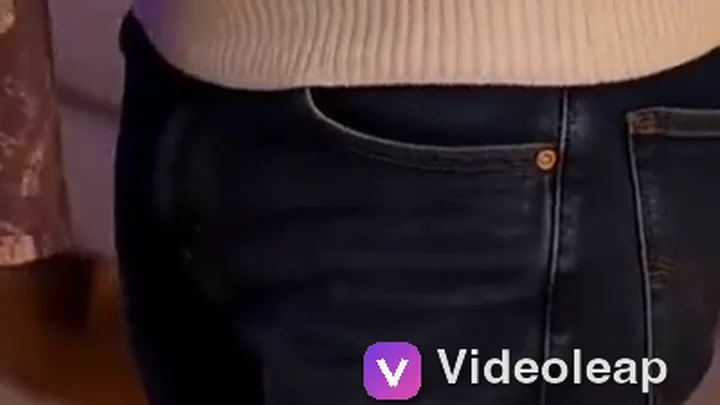
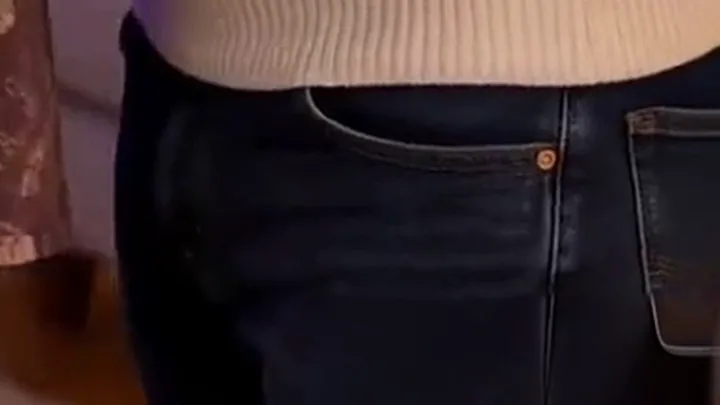
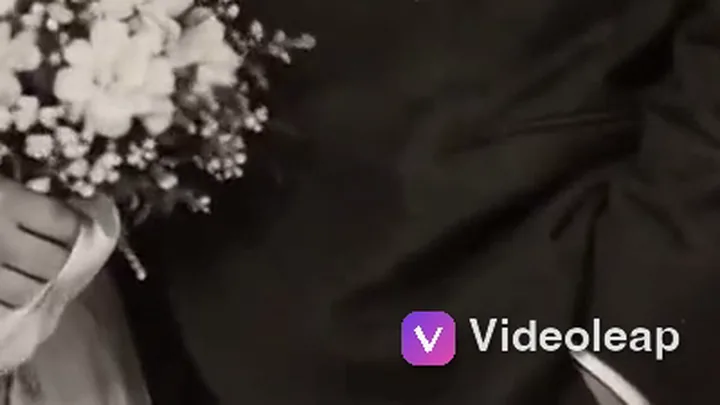
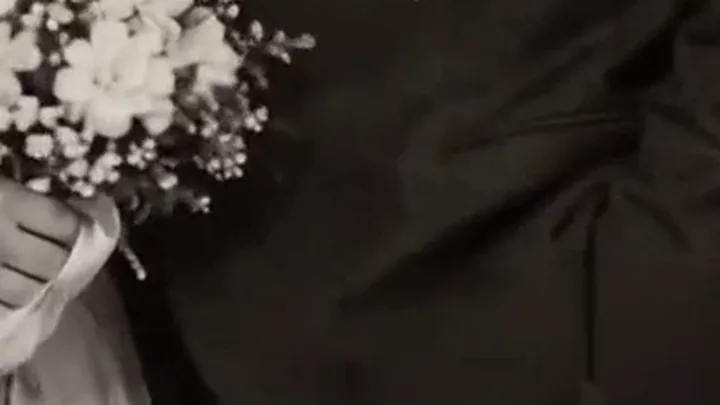
Crops from a 5-second 9:16 clip and a 5-second 4:5 clip, November 21, 2026. Left: upload. Right: result. Both marks are our own recreation of a Videoleap watermark.
 before
 after
Vertical 9:16, mark over a rug and jeans
At 4.8 seconds, after the camera has pushed in, the mark sat on his jeans pocket. The Videoleap watermark is gone and the pocket seam and rivet run straight through.
 before
 after
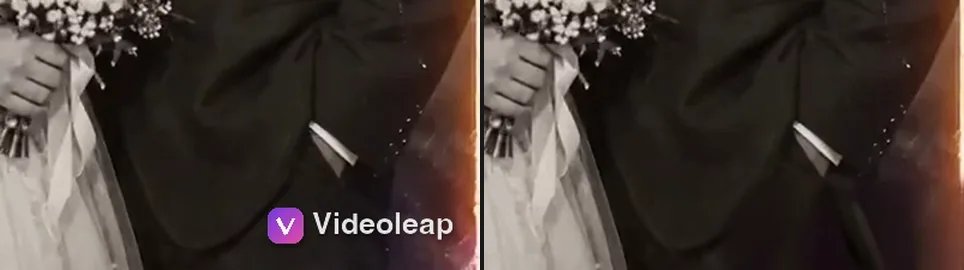
Feed 4:5, mark over a black and white suit
An old black and white wedding photo, slowly zooming in. At 2.5 seconds the Videoleap watermark sat on the groom’s dark sleeve; the fabric folds carry on through the corner. A sliver of white cuff under the letters did not come back.
Why the Videoleap watermark is on your export
Videoleap, the phone editor from Lightricks, stamps a Videoleap watermark on videos exported without a subscription. Replying to App Store reviews, the Videoleap team says exporting projects without the watermark is a Pro feature.
After export, the Videoleap watermark is burned into every frame of the file. You can export again with Pro, crop it out, or rebuild the pixels under it, which is what our remove watermark from video tool does.
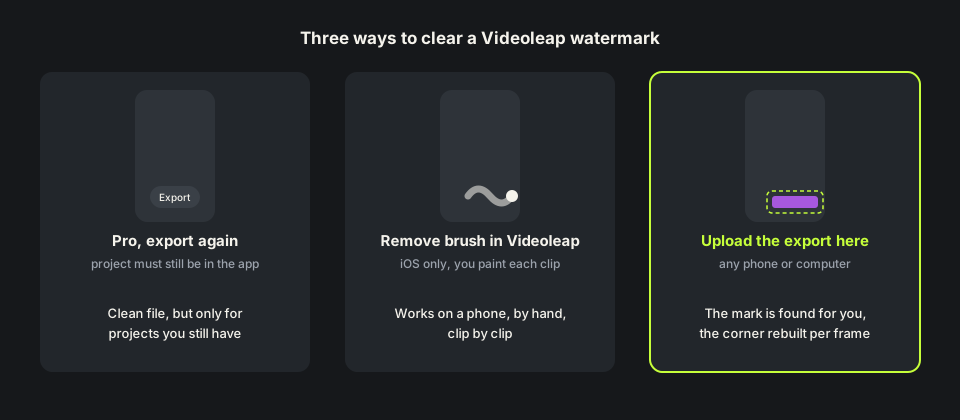
How to remove Videoleap watermark inside Videoleap
Two ways. Subscribe to Pro and export the project again, the clean route if the project is still on your phone. Videoleap also has an AI Remove tool that it says can erase text, logos and watermarks: you brush over the area and tap Apply. Videoleap lists that tool as iOS only and asks you to start a free trial to use it.
Neither helps if you deleted the project or edited on a phone you no longer use, and the brush is not on Android. Then you need to remove Videoleap watermark pixels from the exported file itself: upload it here and the mark is found for you.
How we tested the Videoleap watermark remover
On footage we own we drew a Videoleap watermark in the bottom right corner: a purple icon and the word Videoleap in white, about 170 pixels wide on 720×1280 and 155 on a 720×900 crop, the 4:5 feed size. One clip is a living room hug with a slow push in; the other is an animated wedding photo with a film-burn glow at the start.
Each is about 5 seconds, so 5 credits. The Videoleap watermark was found on every sampled frame with no brushing, and both came back as MP4s of the same size and length with audio kept.

Where the Videoleap watermark remover can slip
Anything hidden under the letters is guessed from the frames around it. In the wedding clip a thin strip of white cuff sat under the Videoleap watermark and came back as plain dark sleeve. In the first half second, an orange and purple light leak crossed the corner; the orange stayed, but the purple sparks under the mark were lost and the cuff came out a little longer.
Light leaks and glitch transitions over the corner are the hardest to rebuild. If your edit opens with one, watch the free preview first; plain shots came back clean.
Remove Videoleap watermark free: credits and file limits
Anyone can watch a free 480p preview of the first 10 seconds without signing up. New accounts get 10 free credits; one credit covers one second, five minimum, so a clip up to 10 seconds is free. Failed jobs are refunded. Packs are on the pricing page.
Files can be MP4, MOV or WebM up to 100MB and 10 minutes, from any browser, Android or laptop included. The remove watermark from video online free page compares the preview with the full result.
Before you upload a Videoleap export
Upload the file Videoleap saved to your camera roll, not a copy downloaded back from TikTok, which adds its own mark. If the Videoleap watermark sits on background you do not need, a crop is a fair free fix.
Use this only on edits you made or have the rights to change. Editing in other phone apps too? The InShot watermark remover and the Alight Motion watermark remover cover their marks, and a hand-drawn animation from FlipaClip has a FlipaClip watermark remover. Page updated November 21, 2026.
Videoleap Pro vs removing the Videoleap watermark
Three ways to deal with the corner mark.
| Pro, export again | Remove brush in Videoleap | Videoleap watermark remover | |
|---|---|---|---|
| What you need | A subscription and the project | An iPhone and the paid trial | Only the exported video |
| Project deleted | Not possible | Works on the file, by hand | Works, upload the file |
| Android or laptop | In the Videoleap app | No, iOS only | Yes, any browser |
| Cost | A Videoleap subscription | Included in the subscription | 1 credit per second; 10 free on sign-up |
| Weak spot | Needs the project | You paint every clip | Fine detail right under the mark |
HOW IT WORKS
Three steps. Under a minute.
Remove watermark from video in three moves — upload, let it auto-remove, then download the clean result.
- 01
Upload your clip
Drag in the video you own. MP4 or MOV.
- 02
Auto-detect & remove
The AI finds the mark and rebuilds the background — no manual masking.
- 03
Preview & download
Compare before/after, then export the clean version.
FAQ
Videoleap watermark — FAQ
Is this Videoleap watermark remover free?
New accounts get 10 free credits, enough for a 10-second clip, and anyone can preview the first 10 seconds. After that it is one credit per second.
Does Videoleap Pro remove the watermark from old exports?
Only if you export the project again. A file you already saved keeps the Videoleap watermark.
Can I remove the Videoleap watermark on Android?
Yes. This runs in the browser, so you can upload from an Android phone, a tablet or a computer.
Will it change my video size?
No. In our tests 720×1280 and 720×900 came back at the same size and length, with the audio track.
Related tools
- Remove watermark from video
- InShot watermark remover
- Alight Motion watermark remover
- KineMaster watermark remover
- Pricing
Remove Watermark from Video is not affiliated with, endorsed by, or sponsored by Lightricks or Videoleap. Videoleap is a trademark of its owner. Our test clips used a recreated Videoleap-style corner mark on footage we own.