MEDAL CLIPS · USERNAME AND MEDAL LOGO · 16:9 AND 9:16
Medal watermark remover for your own game clips
Upload a clip you downloaded from Medal and this Medal watermark remover rebuilds the username and logo corner frame by frame, no Premium needed.
Files auto-delete after processing · Credits refunded if a job fails
Medal watermark remover results on two game clips
Crops from two 5-second clips run through the Medal watermark remover on November 23, 2026. Left: upload. Right: result. Both carry our own recreated mark on public-domain gameplay.
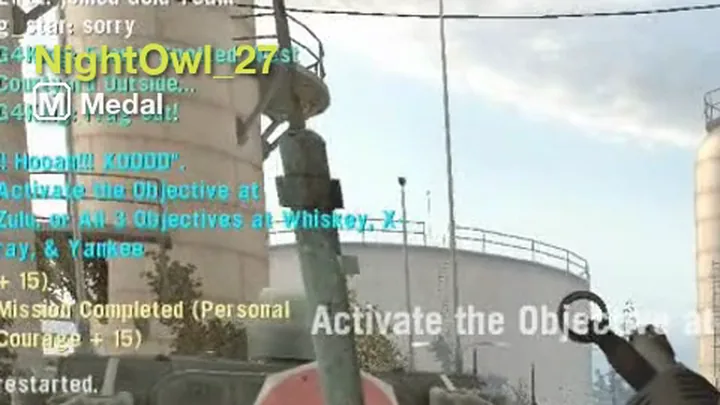 before
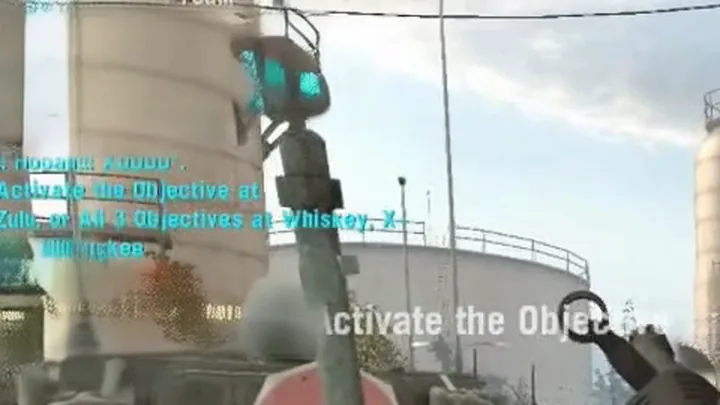 after
16:9, default top-left corner
Medal’s default corner sat on top of the game chat. The Medal watermark remover cleared the username and logo on every frame, but the chat lines under them went too, and a cyan smear was left on the pole where blue text had been.
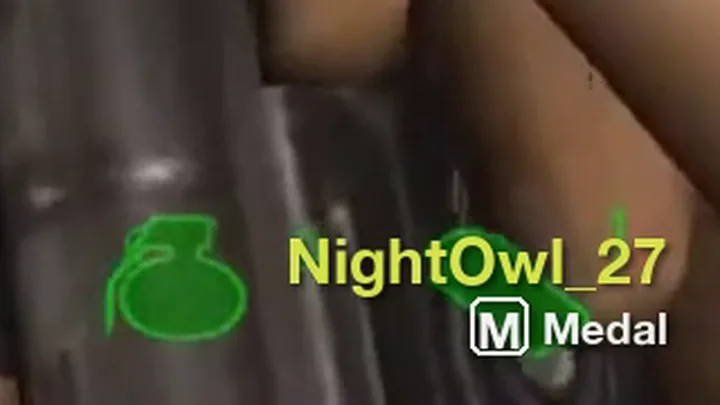 before
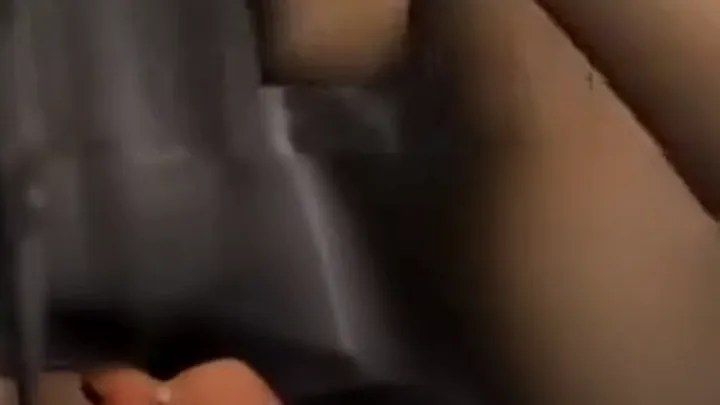 after
9:16, bottom-right next to the HUD
Bottom right, beside the game’s green grenade icon. The Medal watermark remover cleared the username and logo, and the rifle and hand kept their texture, but the grenade icon went with them. At 2.5 seconds a player name tag drifting through the corner was cut in half.
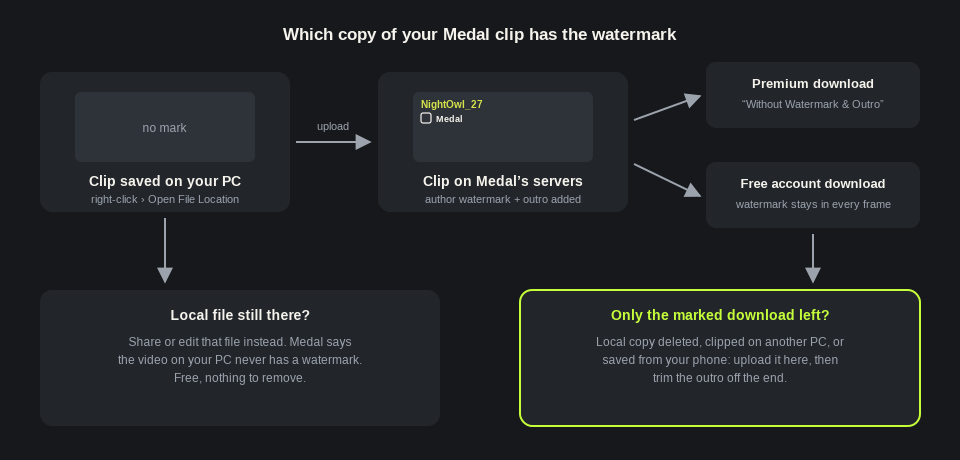
Which copy of your Medal clip has the watermark?
Medal says it plainly: “The video file in your PC will NEVER have a watermark; only clips that are uploaded to our servers will generate a watermark.” The author watermark, your username over the Medal logo, is added when a clip goes to Medal’s servers, along with an outro at the end.
So check your clip library first. If the clip is still there, right-click it and choose Open File Location: that file is clean and free. You need a Medal watermark remover only when the marked download is all you have, say after a reinstall, a wiped drive or a clip saved on your phone. Our remove watermark from video tool then rebuilds the corner.
How to remove Medal watermark the official way
Premium is Medal’s own answer. Its feature chart lists Watermarks and Outros as “Not removable” for free users and “Removable” for Premium, and Premium members get a Without Watermark & Outro option when they download. Every plan starts with a 14-day free trial.
You can also move the mark. Settings > Advanced > Watermark lets you pick any corner, but Medal notes it “will only affect Clips uploaded after the changes have been made.” Clips already uploaded keep the old mark, and that is where a Medal watermark remover helps.
How we tested the Medal watermark remover
We used two public-domain America’s Army clips released by the US Army and drew a Medal watermark on them the way Medal’s own example shows: a lime username, NightOwl_27, above a white M badge and the word Medal. The 16:9 copy, 1280×720, has it top left, the spot in that example. The 9:16 copy, 720×1280, has it bottom right, as on a Shorts crop.
We ran both through the Medal watermark remover with default settings. Each clip runs about 5 seconds, so each job costs 5 credits. Both came back at the same size, length and 29.97 fps, with audio kept. The Medal watermark was gone on every frame we checked.
Will the Medal watermark remover touch my HUD?
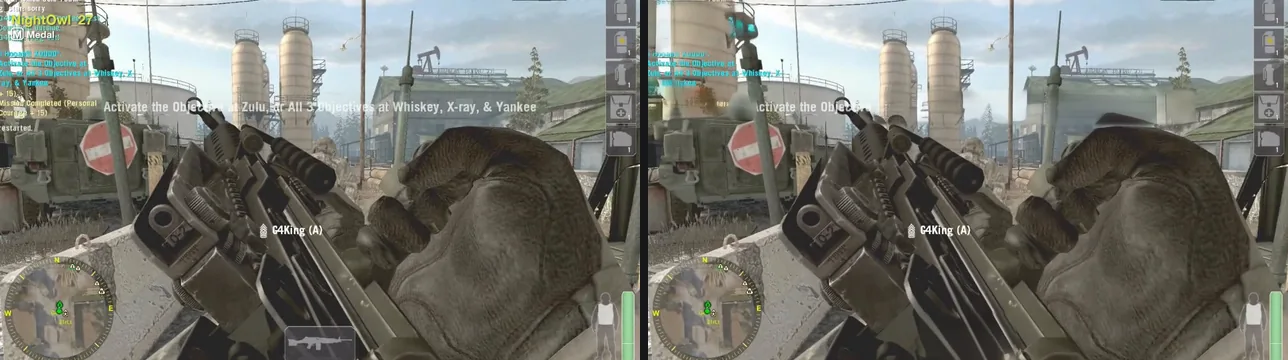
Sometimes. The Medal watermark remover looks for marks that stay put while the game moves. A weapon icon or an objective banner does the same, so it can be taken for part of the watermark.
In the 16:9 test the Medal watermark remover also erased the weapon icon at the bottom, the right half of the “Activate the Objective” banner and the top chat lines the mark covered. In the 9:16 test it took the grenade icon next to the mark, and a player name tag passing through the corner lost its lower half for a moment. The minimap and the right-hand icon column were left alone.
Getting the best result from a Medal watermark remover
Pick a quiet corner before you upload to Medal. If the mark sits over sky or a wall rather than the chat or kill feed, the fill has less to guess. For clips already uploaded, run the free Medal watermark remover preview on the first 10 seconds and check the HUD before you spend credits.
The Medal watermark remover keeps the length, so the outro stays; trim the last seconds in any editor.
Medal watermark remover free: credits and file limits
Anyone can try the Medal watermark remover on a free 480p preview of the first 10 seconds, no sign-up. New accounts get 10 free credits; one credit covers one second, five minimum. Failed jobs are refunded. Packs are on the pricing page.
Files can be MP4, MOV or WebM up to 100MB and 10 minutes. A 1440p, 60 fps clip of a whole round is bigger, so trim it first; the MP4 watermark remover page shows how far 100MB goes.
Only for Medal clips you recorded
Medal adds the author watermark so creators get credit when clips travel. Use a Medal watermark remover only on clips you recorded and uploaded yourself. Medal clips without watermark from other players are theirs to share; removing someone else’s name is against our terms.
Recording with Bandicam instead? The Bandicam watermark remover covers its URL mark. Posting the clip to TikTok afterwards? See how to remove TikTok watermark from video. Page updated November 23, 2026.
Medal Premium vs a Medal watermark remover
Three ways to share a clip without the username and logo, from free to a Medal watermark remover.
| Use the local file | Medal Premium download | Medal watermark remover | |
|---|---|---|---|
| What you need | The clip still on your PC | Premium, or its 14-day trial | Only the downloaded MP4 |
| Local file deleted | Not possible | Works for your uploads | Works |
| Outro | None | Removed | Stays; trim it |
| Cost | Free | Subscription after the trial | 1 credit per second; 10 free on sign-up |
| Weak spot | Only on the PC that recorded it | A monthly bill | Still HUD icons near the mark may go too |
HOW IT WORKS
Three steps. Under a minute.
Remove watermark from video in three moves — upload, let it auto-remove, then download the clean result.
- 01
Upload your clip
Drag in the video you own. MP4 or MOV.
- 02
Auto-detect & remove
The AI finds the mark and rebuilds the background — no manual masking.
- 03
Preview & download
Compare before/after, then export the clean version.
FAQ
Medal watermark — FAQ
How do I get Medal clips without watermark for free?
Use the file Medal saved on your PC; it never has a watermark. If that is gone, new accounts get 10 free Medal watermark remover credits, enough for a 10-second clip.
Does changing the watermark corner fix old clips?
No. Medal says the setting only affects clips uploaded after the change. Older clips keep the mark until you run them through a Medal watermark remover.
Does the Medal watermark remover cut the outro?
No. It cleans the corner on every frame and keeps the length. Trim the outro in any editor.
Can I remove the Medal watermark from someone else’s clip?
No. Only clips you recorded or have the rights to edit. Ask the creator for their original instead.
Related tools
- Remove watermark from video
- Bandicam watermark remover
- Remove TikTok watermark from video
- MP4 watermark remover
- Pricing
Remove Watermark from Video is not affiliated with, endorsed by, or sponsored by Medal.tv. Medal is a trademark of its owner. Our test clips are public-domain America’s Army gameplay with a recreated Medal-style watermark and a made-up username.