OPUS CLIP FREE PLAN · FREE TRIAL · 9:16 AND 16:9 SHORTS
Opus Clip watermark remover that leaves your captions alone
Upload a short you downloaded from Opus Clip and the Opus Clip watermark is rebuilt frame by frame, while the burned-in captions stay put.
Files auto-delete after processing · Credits refunded if a job fails
Opus Clip watermark removed from two test shorts
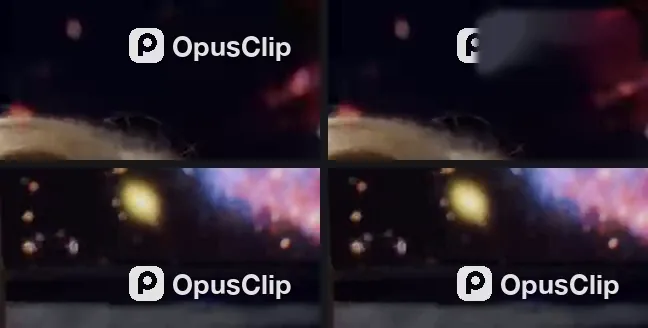
Crops from two 5-second clips, November 26, 2026. Left: upload. Right: result. Both carry our own recreated Opus Clip watermark.
 before
 after
16:9 clip, logo bottom right over a dark set
The speaker’s hand sweeps past the corner. The Opus Clip watermark was gone on every frame we checked, and the hand kept its shape.
 before
 after
9:16 short, logo top right above the speaker
At 3.5 seconds the corner is clean, with no letter outline against the stars.
Where the Opus Clip watermark comes from
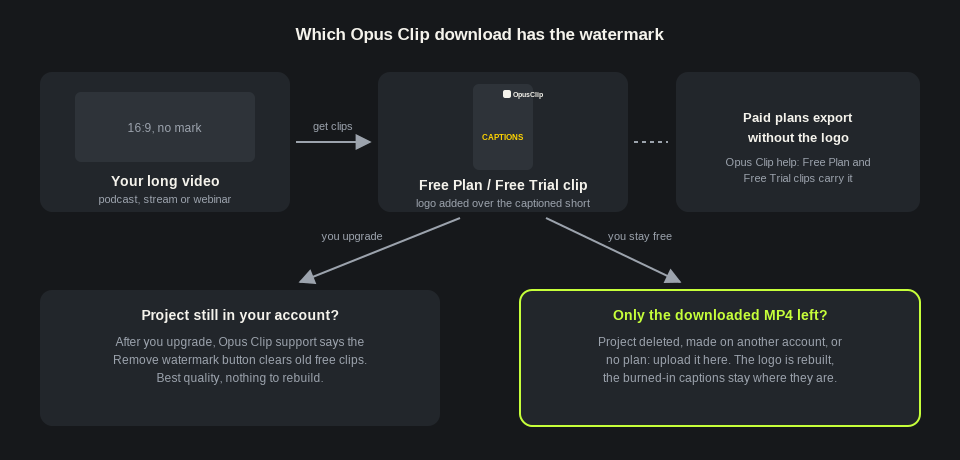
Opus Clip help says clips made on the Free Plan or a Free Trial carry an OpusClip brand logo. Its trial page adds that videos exported during the trial include the Opus Clip watermark, and the Agent Opus docs say free downloads show a mark that appears periodically.
The Opus Clip watermark is added when the clips are exported, so a short you already posted keeps it. Our remove watermark from video tool rebuilds the pixels under the logo instead of cropping the frame.
How to remove Opus Clip watermark the official way
Upgrade to a paid plan. Opus Clip help says the logo is then dropped from your free projects; when a reader on r/opusclip still saw it, Opus Clip support replied to open the project result page and press Remove watermark, then download again.
It gives the cleanest file, but only while the project is still in your account.
Remove Opus Clip watermark from a short you already downloaded
“I don’t have the money to take the $15 plan,” one Reddit user wrote, asking how to remove the Opus Clip watermark without buying it. Others lost the project, or got the clip from a teammate.
Then the downloaded MP4 is all you have. Upload it here, watch the free preview, and download the clip at its own size, frame rate and sound.
Will the Opus Clip watermark remover erase my captions?
Opus Clip shorts live on their animated captions, and a lazy fix wipes them too. Our detector only takes marks that stay in one place; caption lines that change every second are left alone unless you tick the box that also removes on-screen text.
In our 9:16 test the five caption lines, white with yellow keyword highlights, came through every frame untouched while the Opus Clip watermark above the speaker was removed. A caption held still for seconds could pass for a mark, so watch the preview.

How we tested the Opus Clip watermark remover
We cut a public-domain NASA interview into 5-second clips and drew our own Opus Clip watermark: a rounded P badge and the OpusClip name in white with a soft shadow, about 172 pixels wide.
Three clips ran through the same engine as the site, 5 credits each: a 720×1280 short with captions and the logo top right, a 1280×720 clip with the logo bottom right, and that wide clip with a blinking logo. All kept their size, length, 30 fps and audio.
Where the Opus Clip watermark remover can slip
On the vertical short the badge and the word were boxed apart, and from 1.5 to 2.6 seconds only the word was caught: the P badge stayed and a grey smudge replaced the name. The other 3.9 seconds were clean.
The blinking Opus Clip watermark, shown for 1.6 seconds, hidden, then back, was missed entirely; our detector wants a mark that stays put. If your logo comes and goes, check the free preview and stop before you pay.
Opus Clip watermark remover online free: credits and limits
Anyone can watch a free 480p preview of the first 10 seconds without signing up. New accounts get 10 free credits; one credit covers one second, five minimum. Packs are on the pricing page.
Files can be MP4, MOV or WebM up to 100MB and 10 minutes, plenty for a short. Upload the clip, not the long source video.
Before you upload an Opus Clip short
Upload the file Opus Clip gave you, not a copy saved back from TikTok or YouTube; each pass loses detail. Use this only on videos you made or have the rights to edit.
Used a browser editor? The VEED watermark remover and the Kapwing watermark remover cover those corner marks. Page updated November 26, 2026.
Upgrade vs crop vs an Opus Clip watermark remover
Three ways to post a short without the Opus Clip watermark.
| Upgrade, then Remove watermark | Crop or cover the corner | Opus Clip watermark remover | |
|---|---|---|---|
| What you need | The project in your account and a paid plan | Any editor | Only the downloaded MP4 |
| Captions | Unchanged | Can be cut off when you crop | Kept, unless you tick text removal |
| Cost | Monthly plan | Free | 1 credit per second; 10 free on sign-up |
| Weak spot | Gone if the project was deleted | Loses the speaker’s edge on 9:16 | A logo that blinks on and off |
HOW IT WORKS
Three steps. Under a minute.
Remove watermark from video in three moves — upload, let it auto-remove, then download the clean result.
- 01
Upload your clip
Drag in the video you own. MP4 or MOV.
- 02
Auto-detect & remove
The AI finds the mark and rebuilds the background — no manual masking.
- 03
Preview & download
Compare before/after, then export the clean version.
FAQ
Opus Clip watermark — FAQ
How do I remove the Opus Clip watermark for free?
There is no free switch in Opus Clip; paid plans export clean. With only the downloaded short, new accounts here get 10 free credits.
I upgraded but my old clips still have the logo. Why?
Opus Clip support says to open each older project’s result page and press Remove watermark, then download again.
Does the Opus Clip watermark remover keep my captions?
In our test, yes. Changing caption lines are left alone unless you tick the option that also removes on-screen text.
Can I remove Opus Clip watermark online without installing anything?
Yes. It runs in the browser on phone or desktop; upload the MP4, preview, then download.
Related tools
- Remove watermark from video
- VEED watermark remover
- Kapwing watermark remover
- Medal watermark remover
- Pricing
Remove Watermark from Video is not affiliated with Opus Clip. OpusClip is a trademark of its owner. Our test clips are public-domain NASA footage with a recreated Opus Clip-style watermark and captions.