WATERMARK DETECTED · TIKTOK AND CAPCUT MARKS · REELS
Facebook watermark remover for reels flagged Watermark detected
Upload your own clip that shows a TikTok or CapCut mark and get a clean copy back before the Facebook watermark check sees it.
Files auto-delete after processing · Credits refunded if a job fails
Facebook watermark test: two clips before and after
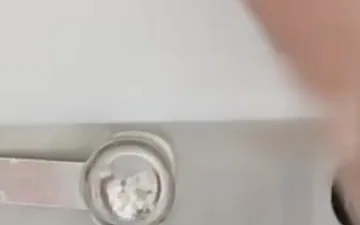
Crops from two Facebook watermark test clips, November 27, 2026. Left: upload. Right: result. The marks are our own recreations.
 before
 after
9:16 reel, TikTok-style mark that jumps corners
At 4.3 seconds, after the jump, the corner is clean; the hand and measuring spoon kept their shape.
 before
 after
4:5 feed video, CapCut-style corner logo
At 1.6 seconds the logo is gone and the hand reads as a hand, just smoother than real skin.
What does Facebook watermark detected mean?
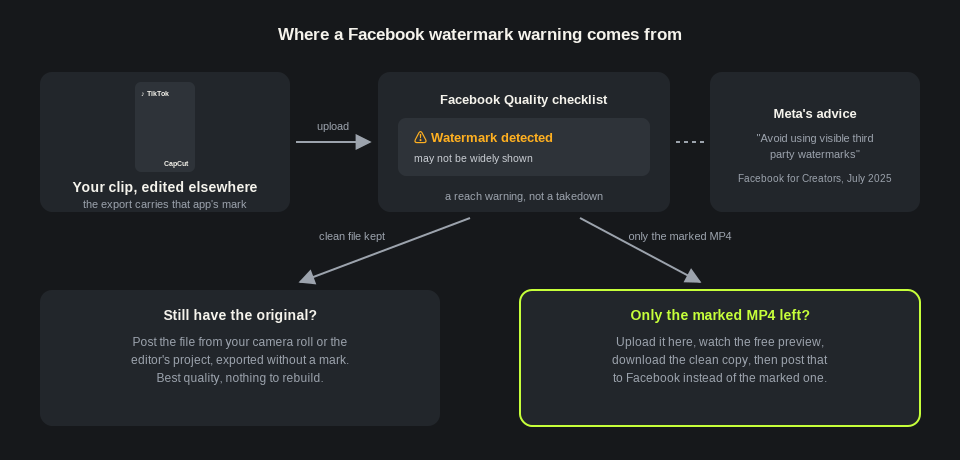
A creator on r/facebook quoted the Facebook watermark warning from their Quality checklist: “Watermark detected — Posts with visible watermarks from other platforms may not be widely shown.” It is a reach warning, not a takedown, and Facebook does not say which mark it found.
Meta’s July 2025 post for creators says: “Avoid using visible third party watermarks.” So a Facebook watermark flag usually means a TikTok, CapCut or other app logo on your own video. Our remove watermark from video tool rebuilds that corner instead of cropping it.
Is there a Facebook reels watermark of its own?
Not according to Facebook’s help page on downloading reels. You can download reels you posted; other people’s reels cannot be downloaded at all. The page mentions muted borrowed audio, not a Facebook reels watermark.
So the Facebook watermark you want gone is almost always another app’s mark, stamped on the export before you uploaded it.
How to remove Facebook watermark from video before you post
First look for a clean file: your camera roll or the editor project may still hold the clip before it was exported with a mark.
If the marked MP4 is all you have, upload it above, watch the free preview and download the result at the same size and frame rate. Post that as a new reel, then check its Quality checklist for the Facebook watermark line.
A Facebook watermark remover does not make a repost original
Meta’s original content guidelines list “Inserting logos or graphics, including watermarks” as a minor change, and third-party clips posted without real changes get less reach. Clearing a Facebook watermark flag cannot change who made the video.
Use it on clips you filmed, edited or have the rights to post. Removing the mark from someone else’s TikTok does not make the repost yours, and we do not help with that.
How we tested the Facebook watermark remover
We cut public-domain U.S. government footage into short clips: a USDA cooking demo cropped to 9:16 and a Marine Corps dog park opening cropped to 4:5, then drew our own marks.
Clip one: a TikTok-style logo with a made-up handle, top left for 3 seconds, then bottom right. Clip two: a CapCut-style logo top right. Clip three: both. All kept their size, length and 30 fps.
Two marks on one reel: a TikTok and CapCut Facebook watermark test
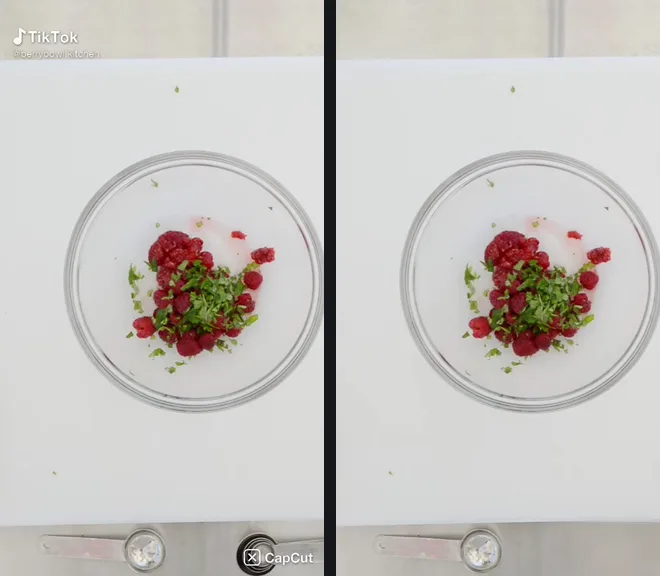
Many reels pass through two apps: cut in CapCut, posted to TikTok, then shared to Facebook. That stacks two marks, and the Facebook watermark check needs only one. Our third clip carried both for all 6 seconds.
Both marks were gone on every frame and the salsa bowl was untouched. But the CapCut-style logo sat on dark measuring spoons; from 1.5 seconds the detector boxed the spoons with the logo, and they vanished too.
Where the Facebook watermark remover can slip
Busy, moving corners are the hardest Facebook watermark case. On the 4:5 dog clip the logo covered a moving hand; it was removed on every frame, yet the rebuilt hand is smeared, with an orange streak at 3 seconds.
On the reel, the glass bowl’s rim under the handle was rebuilt as plain board, so the curve stops short. Nothing outside the marks changed; still, watch the free preview.

Facebook watermark remover online free: credits and limits
Anyone can watch a free 480p preview of the first 10 seconds without signing up. New accounts get 10 free credits, one per second, so clearing a Facebook watermark from a short reel is free. Packs are on the pricing page.
Files can be MP4, MOV or WebM up to 100MB and 10 minutes. Captions stay unless you tick Also remove captions & on-screen text, at 2 credits per second.
Before you upload a clip for Facebook
Check every corner for a Facebook watermark trigger, your own channel logo included: the Reddit poster still got the warning after removing their logo.
Specific marks have their own tests: remove TikTok watermark from video, remove CapCut watermark from video and remove Instagram watermark from video. Page updated November 27, 2026.
Post the original vs crop vs a Facebook watermark remover
Three ways to post a clip without a Facebook watermark warning.
| Post the original file | Crop or blur the corner | Facebook watermark remover | |
|---|---|---|---|
| What you need | The clip before it was exported with a mark | Any editor | Only the marked MP4 |
| Picture | Untouched | Edges cut off, or a smudge Facebook may still see | Full frame, the corner rebuilt |
| Cost | Free | Free | 1 credit per second; 10 free on sign-up |
| Weak spot | Gone if you only kept the export | Loses faces and text near the edge on 9:16 | Busy, moving corners come back smeared |
HOW IT WORKS
Three steps. Under a minute.
Remove watermark from video in three moves — upload, let it auto-remove, then download the clean result.
- 01
Upload your clip
Drag in the video you own. MP4 or MOV.
- 02
Auto-detect & remove
The AI finds the mark and rebuilds the background — no manual masking.
- 03
Preview & download
Compare before/after, then export the clean version.
FAQ
Facebook watermark — FAQ
Will removing the mark clear the Facebook watermark detected warning?
We cannot promise it, because Facebook does not say what it detected. Post the clean copy as a new reel and check its Quality checklist.
How do I remove a Facebook watermark for free?
Post the clean original if you kept it. If not, the preview here is free and new accounts get 10 free credits, enough for a 10-second reel.
Does Facebook put a watermark on reels I download?
Facebook’s help page on downloading your own reels does not mention a Facebook watermark. Other people’s reels cannot be downloaded.
Can I remove the Facebook watermark from someone else’s video?
Only if you have the rights to use it. Meta counts reposted clips with minor changes as unoriginal, mark or no mark.
Related tools
- Remove watermark from video
- Remove TikTok watermark from video
- Remove CapCut watermark from video
- Remove Instagram watermark from video
- Pricing
Remove Watermark from Video is not affiliated with Facebook, Meta, TikTok or CapCut. Their names are trademarks of their owners. Our test clips are public-domain U.S. government footage with recreated TikTok-style and CapCut-style marks.